

Matomo Analytics for WordPress
Full Matomo analytics platform running inside WordPress, with ecommerce, goals, tag manager and GDPR tools; premium plugins add heatmaps and more.
86

Self-hosted, privacy-focused WordPress analytics with goals, real-time stats and optional cookieless tracking; Pro adds UTM, forms and WooCommerce.

Burst Statistics is a self-hosted analytics plugin from Really Simple Plugins, the team behind Complianz and Really Simple Security. It records visits with a small JavaScript tracker and stores everything in your own WordPress database, so there is no external account and no data sent to Google or other third parties.
The free plugin covers the basics most site owners check: visitors, sessions, pageviews, bounce rate, top pages, referrers, devices and country-level location, plus a live view of who is on the site. It also includes goal tracking for clicks, page views and WordPress hooks, weekly or monthly email reports, period comparisons and an optional Google Search Console panel. Tracking can run with cookies, in a cookieless mode, or in a hybrid mode that only sets cookies after consent.
Pro is sold in three tiers. Creator adds UTM campaign and URL-parameter reports, city-level geography, form, outgoing-link, 404 and site-search tracking, campaign-filtered dashboards, CSV export and data archiving. Business adds WooCommerce revenue, product, cart-abandonment and funnel analytics with sales attribution. Agency adds customisable, branded PDF/email client reports, shareable reports and a MainWP integration, with unlimited sites.
Historical data from other analytics plugins cannot be imported, user-role access is handled by capabilities rather than a settings screen, and the most useful marketing reports (UTM, forms, WooCommerce) sit behind paid tiers. There is no GA4 or Google Tag Manager integration because Burst is designed to replace them.
Burst suits bloggers, small businesses and agencies that want an easy, privacy-first replacement for Google Analytics inside WordPress, especially those already using Complianz.
Best for: Small businesses and bloggers who want a simple, privacy-friendly Google Analytics replacement inside WordPress.
Burst Statistics is one of the easiest self-hosted analytics plugins to live with: the free version covers traffic, goals and email summaries well. Marketers who need campaign, form or WooCommerce attribution will need a paid tier, but pricing is modest.
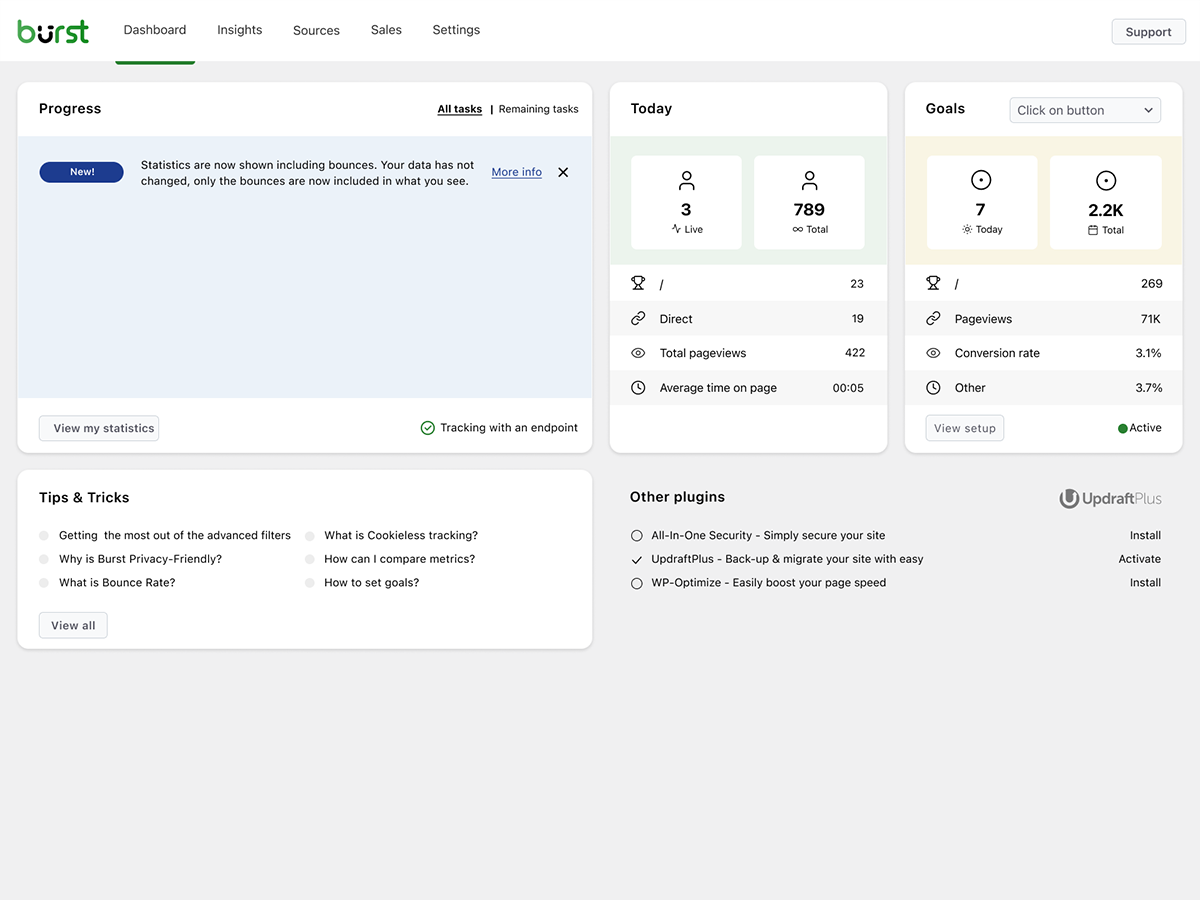
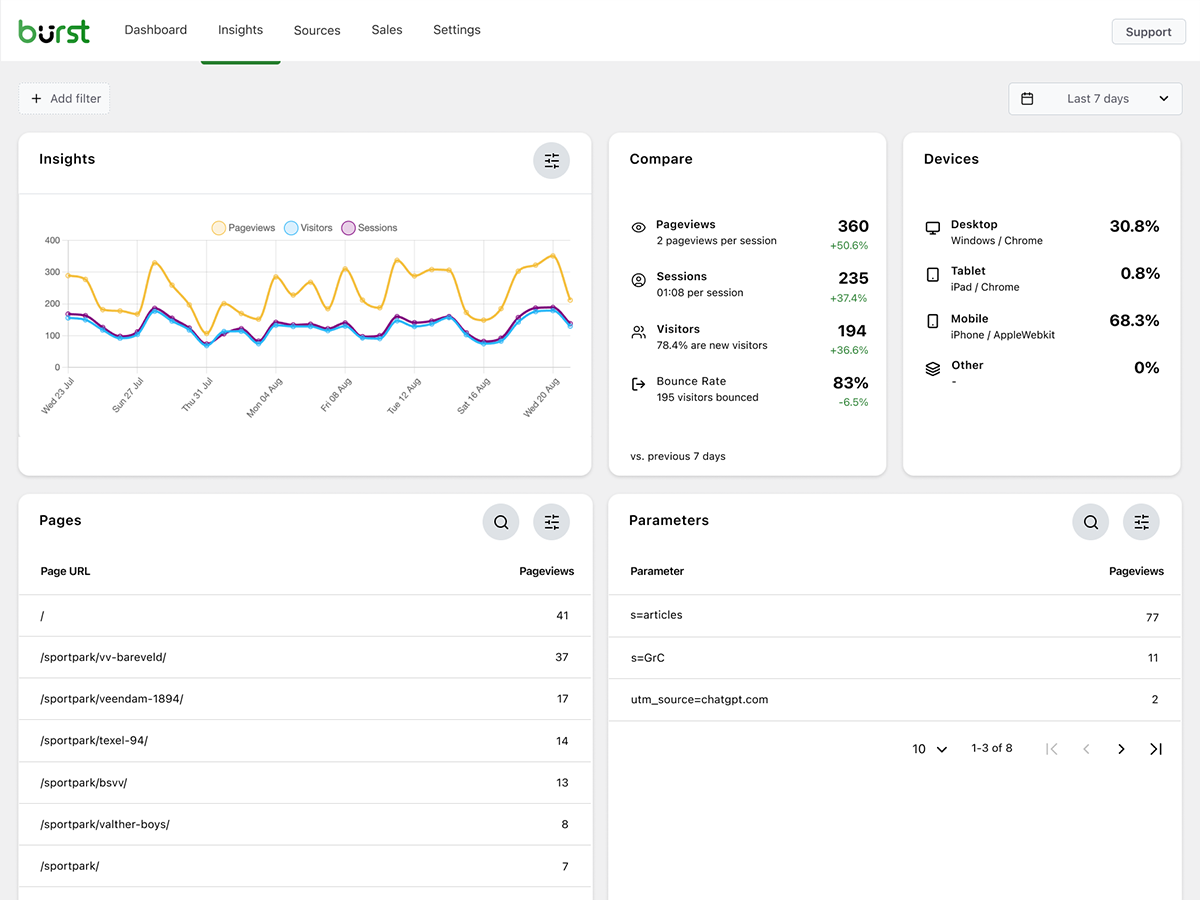
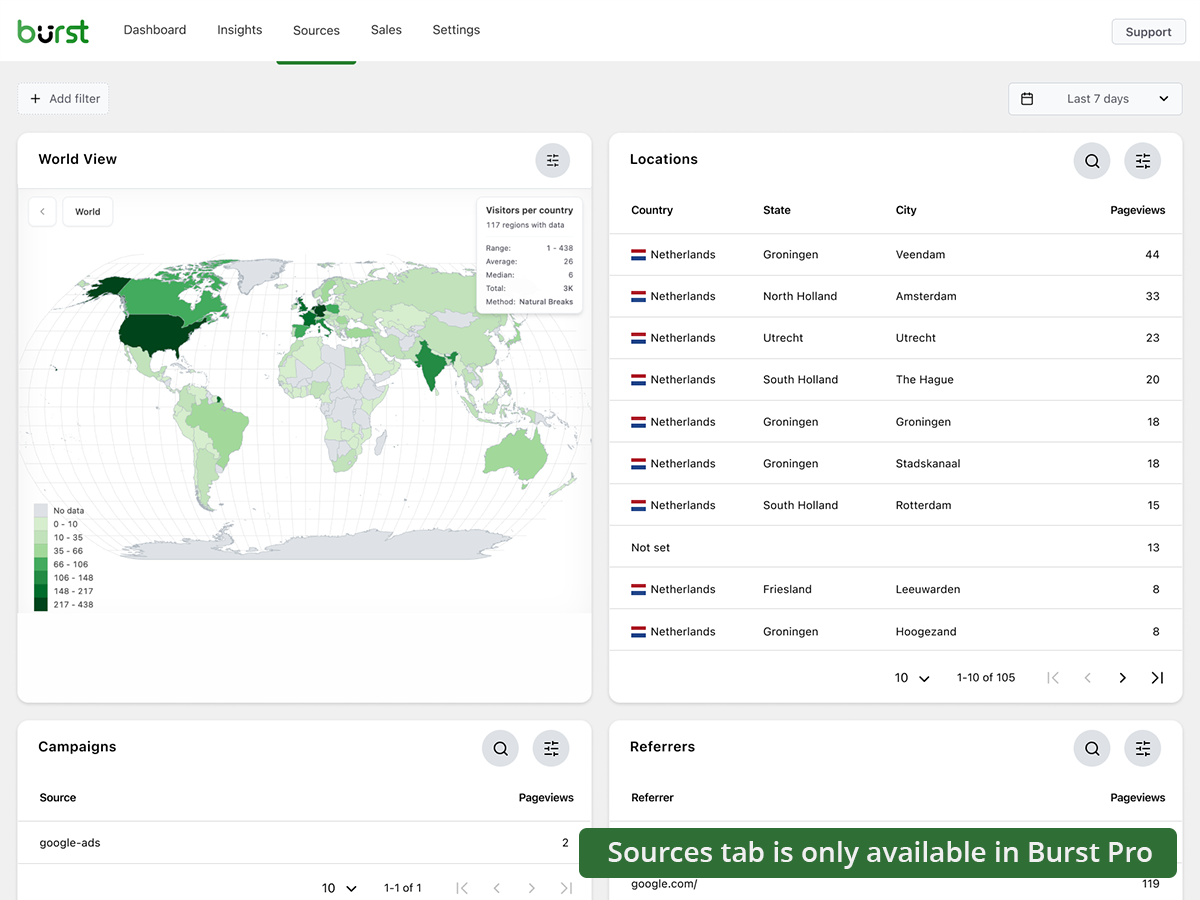
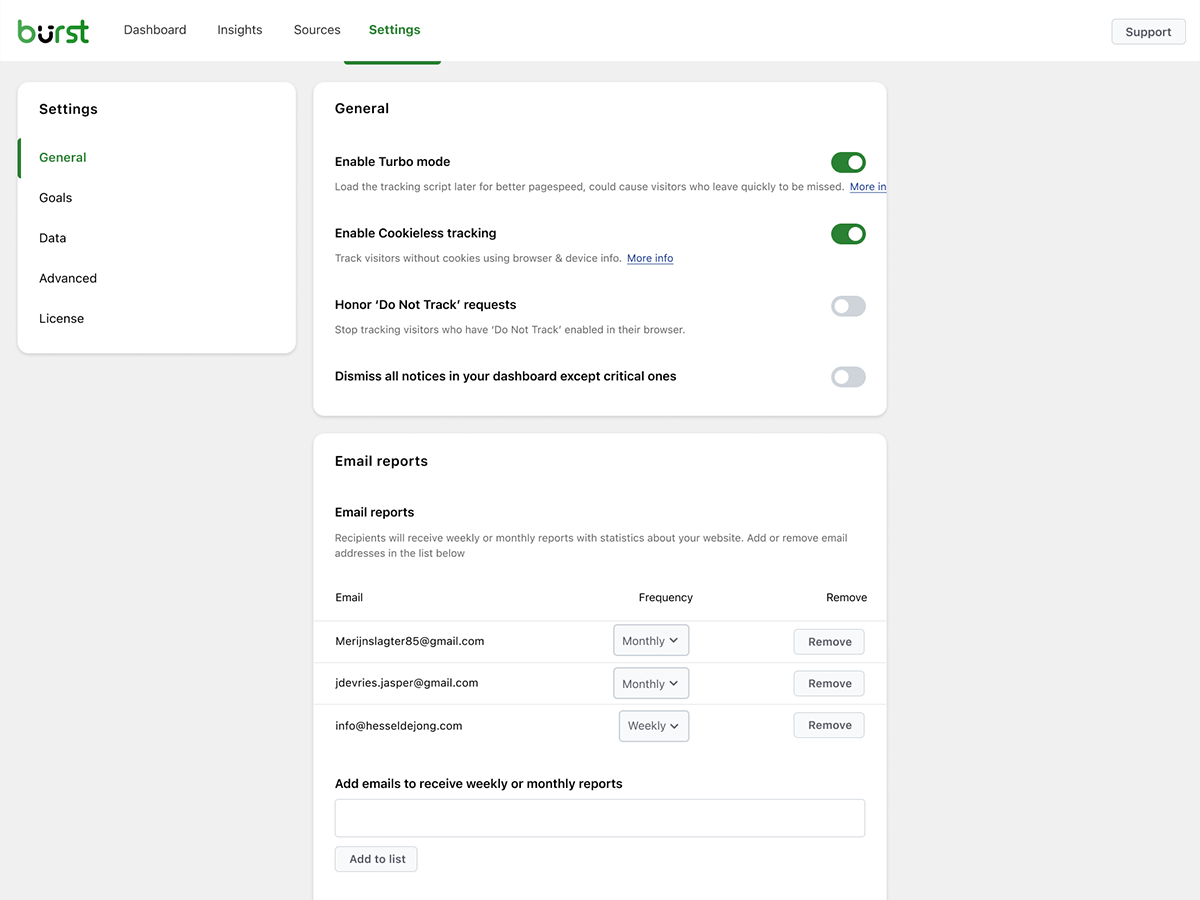
What Burst Statistics highlights on its WordPress.org page and its own website, split by version.
23 of 27 features we track in Analytics Plugins, feature score 78/100
Connects a GA4 property and adds the tracking code for you.
Built as a GA replacement; it does not add or connect a GA4 property.
Tracks visits itself and stores data in your WordPress database.
All statistics are stored locally in your WordPress database.
Counts visits without setting tracking cookies.
Optional cookieless mode, plus a hybrid mode that sets cookies only after consent.
Shows who is on the site right now.
Live count of active users, the pages they are on and their sources.
Adds or works with Google Tag Manager containers.
No Google Tag Manager integration is offered or documented.
Records hits on the server, unaffected by ad blockers.
Pageviews come from a JS beacon; goals and ecommerce can be recorded server-side via hooks.
Small or no front-end script, so tracking does not slow pages.
Tracking script under 4 KB, with Turbo mode to defer loading.
Tracks outbound links, file downloads and button clicks.
Free click goals; automatic outgoing link tracking needs Creator.
Tracks form views and submissions.
Automatic form tracking with CF7, WPForms, Gravity Forms and others.
Tracks orders, revenue and products from WooCommerce.
Revenue, products, cart abandonment, AOV and funnels.
Reports on UTM campaigns, sources and mediums.
UTM campaign and URL parameter reports with campaign-filtered dashboards.
Set goals and see conversion rates.
Goals for views, clicks, WordPress hooks and custom events with conversion stats.
Report by author, category, post type, user role and similar.
No reports by author, category or user role are documented.
Measures how far visitors scroll.
Free plan lists engagement and reading tracking; no dedicated scroll-depth report confirmed.
Traffic reports in the WordPress admin, no need to open another tool.
Dashboard, Insights and Sources screens inside wp-admin.
Shows which content gets the most visits.
Top pages and posts ranked by views.
Where visitors come from.
Referral sources listed free; deeper source analysis in Creator.
Country, browser and device breakdowns.
Country and device breakdowns free; city-level data needs Creator.
Visit numbers shown on each post or in the editor.
Pageviews Counter block shows views on a page; no editor panel documented.
Search queries and rankings from Google Search Console.
Optional integration shows Google search data in the dashboard.
Scheduled email reports with key stats.
Weekly or monthly email reports; Agency adds branded PDF client reports.
Export to CSV or PDF.
CSV export (listed as coming soon on the pricing page).
IP anonymisation, consent mode or cookie-banner integration.
Cookieless mode, Do Not Track support and Complianz consent integration.
Leave admins or chosen roles out of the stats.
Exclude chosen user roles and IPv4/IPv6 addresses from tracking.
Filters out bots and crawlers.
Known crawlers are not tracked; custom user-agent and referrer block rules.
Choose which user roles can view reports.
Access uses view_burst_statistics and manage_burst_statistics capabilities; no role UI.
Works across a WordPress multisite network.
Multisite support is not documented; Creator offers per-domain filtering only.
On WordPress.org
Unlimited
Unlimited pageviews, real-time stats, goals and email reports.
1 site
$79/year for up to 5 sites. 14-day free trial.
1 site
$119/year for up to 5 sites. Adds WooCommerce analytics.
Unlimited
Adds branded PDF/email client reports and sharing.
Prices are list prices from the vendor's site, checked 14 Oct 2026. Many vendors discount the first year.
Free installs from WordPress.org, the vendor's own claim, and our estimate of paid installs.
Active installations reported by WordPress.org.
Sites/users claimed on the vendor's website. source
Our estimate, see method below.
How we estimated this: The vendor figure (200K+) is within WordPress.org's rounding of the free installs, so it says nothing about paid sites. 1,000 paying customers or sales over 3 years; assuming 55% still use it and 1.3 sites per licence gives 720. About 250K free installs x 4% (the usual share of free sites that also run the paid version when most features are free) gives 10K. Combining these (weighted average) gives about 1.2K. Likely range: 780 to 1.8K. This counts sites running the paid version, including sites whose licence has lapsed. Estimates are rough and based on public figures as of 14 Oct 2026.
114,274 downloads last week, 9.1M all time
| Version | 3.7.4 |
|---|---|
| Last updated | 29 Oct 2026 (4 days ago) |
| Tested up to | WordPress 7.1.4 |
| Requires | WordPress 6.6+, PHP 8.0+ |
| Support threads (2 months) | 22 of 22 resolved |
| On WordPress.org since | 4 Feb 2022 |
| Paying customers claimed | 1,000+ (source, 10 Oct 2026) Testimonials section says 'Trusted by 1000+ customers'. |
|---|---|
| Refund policy | 14-day free trial plus 30-day money-back (source, 10 Oct 2026) |
Full Matomo analytics platform running inside WordPress, with ecommerce, goals, tag manager and GDPR tools; premium plugins add heatmaps and more.

Freemium Google Analytics plugin from Awesome Motive that adds GA4 tracking and in-dashboard reports, with eCommerce, forms and custom dimensions in paid…

Privacy-friendly, self-hosted WordPress analytics with cookieless tracking and reports in the admin; Pro adds real-time, campaigns, clicks, forms and sales.

Google's free official plugin that connects Analytics, Search Console, Tag Manager, AdSense and PageSpeed Insights and shows their data in WordPress.

Freemium Google Analytics dashboard plugin from Awesome Motive, a close sibling of MonsterInsights, adding GA4 tracking and reports to WordPress.

Long-running self-hosted WordPress analytics plugin with cookieless tracking, detailed content, referral and geo reports, and paid add-ons for marketing.
Yes. Burst Statistics has a free version on WordPress.org. Paid plans start at $49/yr.
WordPress.org reports 200K+ active installations of the free version. The vendor claims 200K+ sites in total. We estimate around 1.2K sites run the paid version.
No: not included. Built as a GA replacement; it does not add or connect a GA4 property.
Yes: included. All statistics are stored locally in your WordPress database.
Yes: included. Optional cookieless mode, plus a hybrid mode that sets cookies only after consent.
Yes: partial. Free click goals; automatic outgoing link tracking needs Creator.
Yes: paid version (Business). Revenue, products, cart abandonment, AOV and funnels.
Yes: included. Dashboard, Insights and Sources screens inside wp-admin.
Yes: included. Weekly or monthly email reports; Agency adds branded PDF client reports.
Yes: included. Cookieless mode, Do Not Track support and Complianz consent integration.
Yes. The free plugin has no tracking limits and includes real-time stats, goals and email reports. Pro tiers add campaign, form, WooCommerce and client-reporting features.
Burst sets cookies by default, but you can switch on cookieless tracking or a hybrid mode that only sets cookies after consent. Whether you still need a banner depends on your jurisdiction.
No. The vendor states historical data from other plugins cannot be imported, so stats start from the day you install Burst.
Basic pageview tracking works on any plan, but revenue, product, cart-abandonment and funnel reports require Burst Pro Business or Agency.
Last updated 10 Oct 2026. Spotted something wrong? Suggest an edit.