
Extra Product Options for WooCommerce (ThemeHigh)
ThemeHigh's freemium product fields plugin: 20 free field types in sections with product/category rules; Pro adds pricing, formulas, uploads and swatches.
100

WP Desk's WooCommerce product fields plugin: 18 free field types including image and colour radios, with pricing, conditions and category rules in PRO.

Flexible Product Fields (FPF) is a WooCommerce product add-ons plugin from WP Desk, a Polish developer known for Flexible Checkout Fields and shipping plugins. It adds custom fields to product pages so shoppers can personalise items or pick extras, as an alternative to building large numbers of variations.
The free plugin on WordPress.org has a generous set of 18 field types: text, textarea, number, email, URL, checkbox, multi-checkbox, select, multi-select, radio, radio with images, radio with colours, time, colour picker, heading, paragraph, image and HTML. You build field groups and assign them to specific products, and the selected values appear in the cart, checkout, order summary and the order edit screen. Fields can be marked required, styled with CSS classes and translated with WPML, Polylang or Loco Translate. A block lets you place a field group in block themes.
The paid FPF PRO licence unlocks most of the commercial features. Prices on fields, either fixed amounts or a percentage of the product price, are PRO only, as are the date picker with exclusion rules, file uploads, conditional logic, assigning groups to categories, tags, variations or all products, group ordering and duplication. PRO also integrates with WP Desk’s separate Flexible Quantity plugin for unit-based pricing, and there are paid add-ons such as a multistep configuration and booking.
FPF is a sensible choice for stores that want free personalisation fields with visual choices, or a low-cost PRO upgrade for straightforward fixed or percentage pricing. Stores needing formulas or editable carts should look at more advanced options plugins.
Best for: Stores wanting free personalisation fields with visual choices, or a cheap upgrade for simple priced add-ons.
Flexible Product Fields has one of the broader free field sets, but almost every commercial feature, from pricing to conditional logic and category rules, sits behind PRO. At its price the PRO licence is good value for simple add-ons, though it lacks the formulas and cart editing of the category leaders.

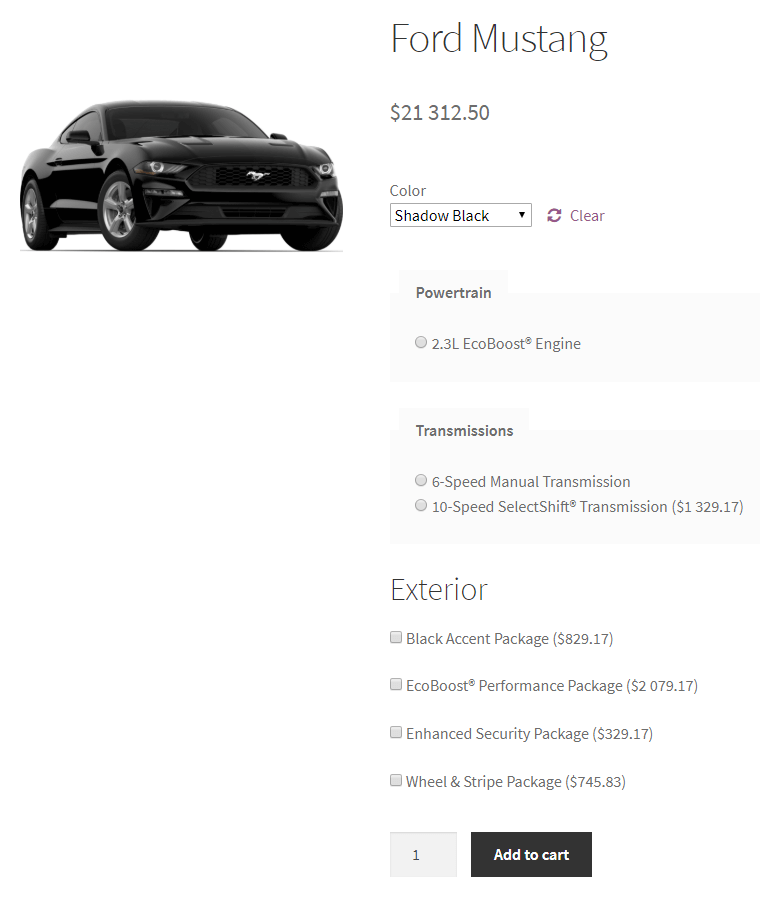
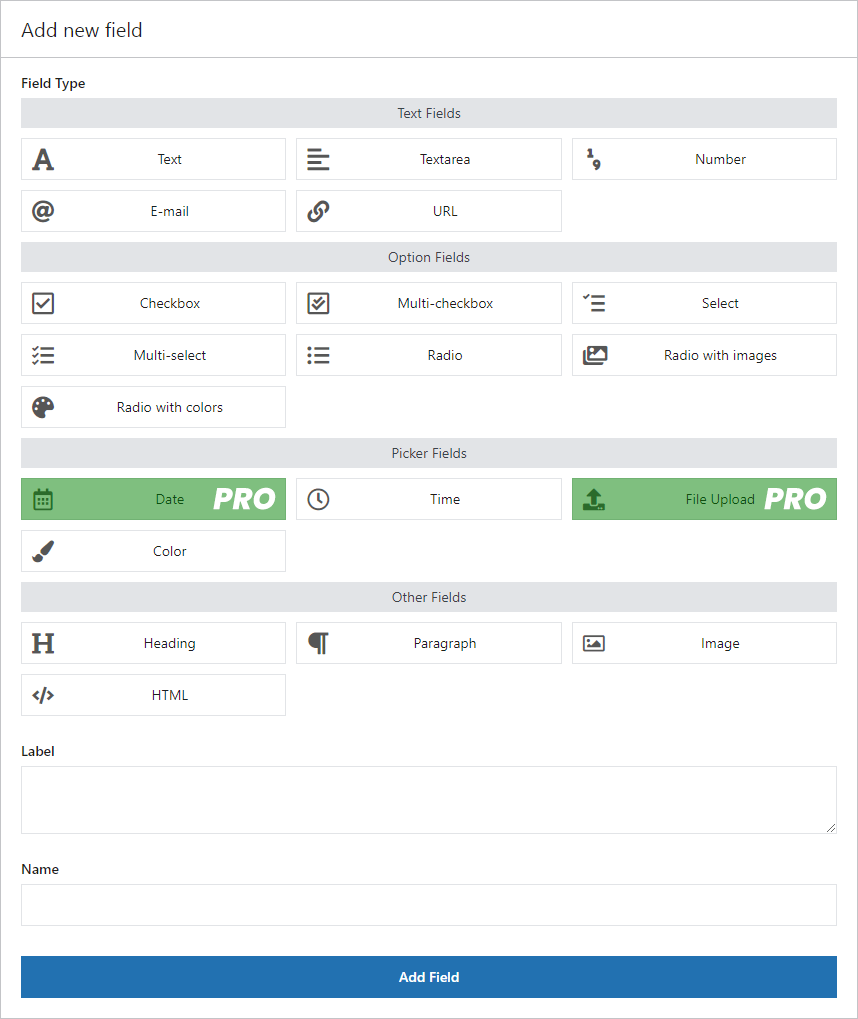
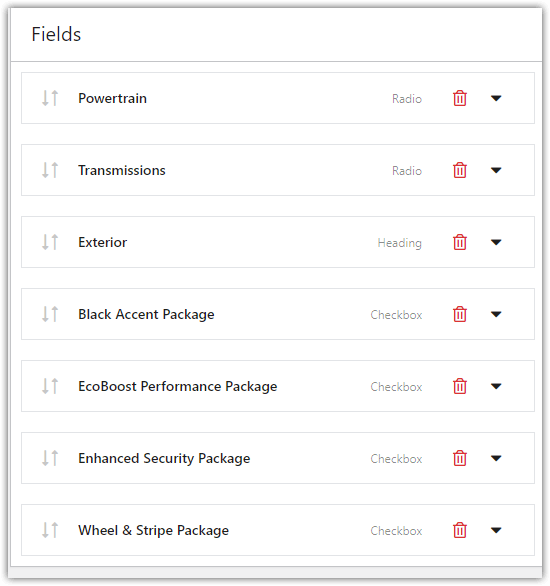
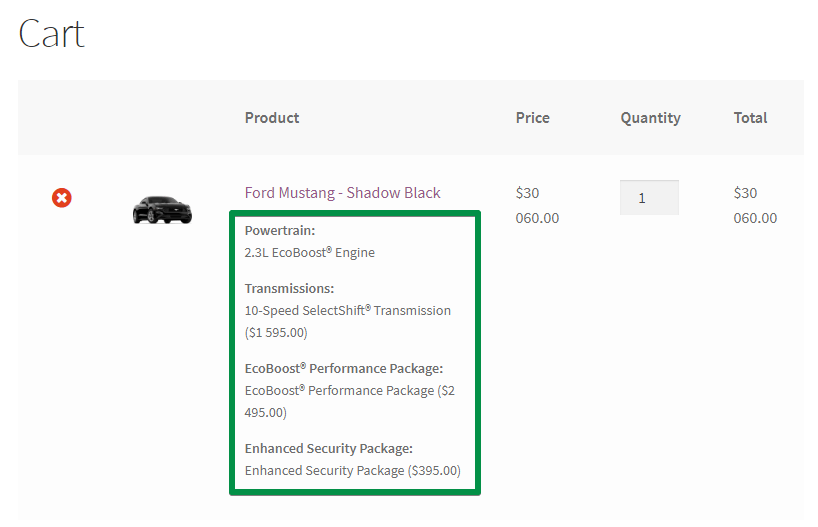
What Flexible Product Fields highlights on its WordPress.org page and its own website, split by version.
18 of 21 features we track in WooCommerce Product Add-ons, feature score 87/100
Custom text input, e.g. engraving or gift messages.
Free text, textarea, email and URL fields.
Choice fields for options.
Free select, multi-select and radio fields.
Multi-select add-ons.
Free checkbox and multi-checkbox fields.
Visual option pickers with images or colours.
Free radio with images and radio with colours fields.
Customers upload files (artwork, photos) with the product.
File upload field is PRO only.
Date or time selection fields.
Free has a time field; the date picker with date exclusions is PRO.
Numeric input or per-option quantities.
Free number field.
Show or hide options based on other choices.
PRO shows or hides fields based on other values with AND/OR rules.
Add a fixed amount for an option.
Fixed prices per field or option are PRO only.
Add a percentage of the product price.
PRO can price a field as a percentage of the product price.
Prices from formulas, e.g. per character or by size.
No formulas; unit-based pricing via WP Desk's separate paid Flexible Quantity plugin.
Updated total shown on the product page as options change.
Totals box under the fields reflects priced options, and pricing needs PRO.
Apply one set of options to many products, categories or tags.
PRO assigns groups to categories, tags or all products.
Add options to an individual product.
Free version assigns field groups to specific products.
Show options for specific variations.
Fields for specific variations, loaded over AJAX, are PRO.
Selected options shown everywhere the order appears.
Values appear in cart, checkout, order summary and order edit screen.
Change selected options from the cart.
No cart editing in the feature list or documentation.
Move option groups between stores.
No import/export of field groups; PRO can only duplicate groups.
Works with WPML, Polylang or similar.
Works with WPML, Polylang and Loco Translate; WPML guide in docs.
Declared compatible with WooCommerce High-Performance Order Storage.
HPOS support added in version 2.3.0 and declared in the plugin.
Works with the WooCommerce Cart and Checkout blocks.
Has a product-page block, but no Cart/Checkout blocks statement or declaration found.
On WordPress.org
1 site
Listed as $59/yr (shown as £59 to UK visitors). Updates and email support for 1 year; 30-day money-back.
1 site
All 25 WP Desk plugins for 1 site; 25-site bundle listed at 199/yr. Figures seen in GBP, assumed same numerals in USD.
Prices are list prices from the vendor's site, checked 14 Oct 2026. Many vendors discount the first year.
Free installs from WordPress.org, the vendor's own claim, and our estimate of paid installs.
Active installations reported by WordPress.org.
Sites/users claimed on the vendor's website. source
Our estimate, see method below.
How we estimated this: About 15K free installs x 30% (the usual share of free sites that also run the paid version when many key features are paid, and store owners upgrade more often) gives 4.5K. The vendor figure (239K+) is more than 8 times the free installs, so it probably counts more than this plugin (other products or platforms) and we leave it out. Likely range: 2.3K to 9K. This counts sites running the paid version, including sites whose licence has lapsed. Estimates are rough and based on public figures as of 14 Oct 2026.
697 downloads last week, 800.3K all time
| Version | 2.14.9 |
|---|---|
| Last updated | 20 Aug 2026 (75 days ago) |
| Tested up to | WordPress 7.1.4 |
| Requires | WordPress 6.4+, PHP 7.4+ |
| Support threads (2 months) | 1 of 1 resolved |
| On WordPress.org since | 22 Feb 2017 |
| Refund policy | 30-day money-back (source, 5 Oct 2026) |
|---|
 Flexible Product Fields/Woo Product Add-Ons
 Flexible Product Fields/YITH WooCommerce Product Add-ons & Extra OptionsFlexible Product Fields/Extra Product Options for WooCommerce (ThemeHigh)
 Product Addons for WooCommerce (Acowebs)/Flexible Product Fields
 Flexible Product Fields/Extra Product Options & Add-Ons for WooCommerce (ThemeComplete)
 Advanced Product Fields for WooCommerce/Flexible Product Fields
 Flexible Product Fields/PPOM – Product Addons & Custom Fields for WooCommerce
 WooCommerce Product Options by Barn2/Flexible Product Fields
ThemeHigh's freemium product fields plugin: 20 free field types in sections with product/category rules; Pro adds pricing, formulas, uploads and swatches.
Acowebs' drag-and-drop product fields builder with free conditional fields; Pro adds pricing, formulas, lookup tables, uploads and swatches.
Premium WooCommerce product add-ons plugin from Barn2 with 16+ option types, conditional logic, price formulas, cart editing and import/export.
Lightweight WooCommerce product options plugin from Studio Wombat, with a free field builder and paid tiers for swatches, uploads, dates and formula…
Premium ThemeComplete product options builder, sold on CodeCanyon and direct, with math-formula and lookup-table pricing, swatches and global forms.
Themeisle's WooCommerce product options plugin: nine free field types with conditional logic, and 30+ Pro inputs such as uploads, swatches and price…
Yes. Flexible Product Fields has a free version on WordPress.org. Paid plans start at $59/yr.
WordPress.org reports 10K+ active installations of the free version. The vendor claims 239K+ sites in total. We estimate around 4.5K sites run the paid version.
Yes: included. Free text, textarea, email and URL fields.
Yes: included. Free radio with images and radio with colours fields.
Yes: paid version (PRO). File upload field is PRO only.
Yes: paid version (PRO). PRO shows or hides fields based on other values with AND/OR rules.
Yes: paid version (PRO). Fixed prices per field or option are PRO only.
Yes: paid version (PRO). PRO assigns groups to categories, tags or all products.
No. Fixed and percentage prices on fields are a PRO feature. The free version adds informational fields that are saved with the order.
No. Conditional logic, with all-rules or any-rule matching, is part of FPF PRO.
Only in PRO, which can assign groups to categories, tags, variations or all products. The free version assigns groups to specific products.
Not on its own. PRO integrates with WP Desk's separate Flexible Quantity plugin for unit-based pricing; there is no built-in formula editor.
Last updated 5 Oct 2026. Spotted something wrong? Suggest an edit.