

FluentCRM
Self-hosted email marketing and CRM plugin by WPManageNinja: unlimited contacts, campaigns and automation funnels, sending through your own SMTP or ESP.
91

Self-hosted CRM and marketing automation for WordPress with a visual flow builder, broadcasts, forms and contact records; premium plans add integrations.
Groundhogg is a CRM and marketing automation plugin that keeps contacts, emails and automation data inside your WordPress database. It is aimed at small businesses, course creators and agencies who want something closer to ActiveCampaign or Keap than a simple newsletter tool, without per-contact SaaS fees.
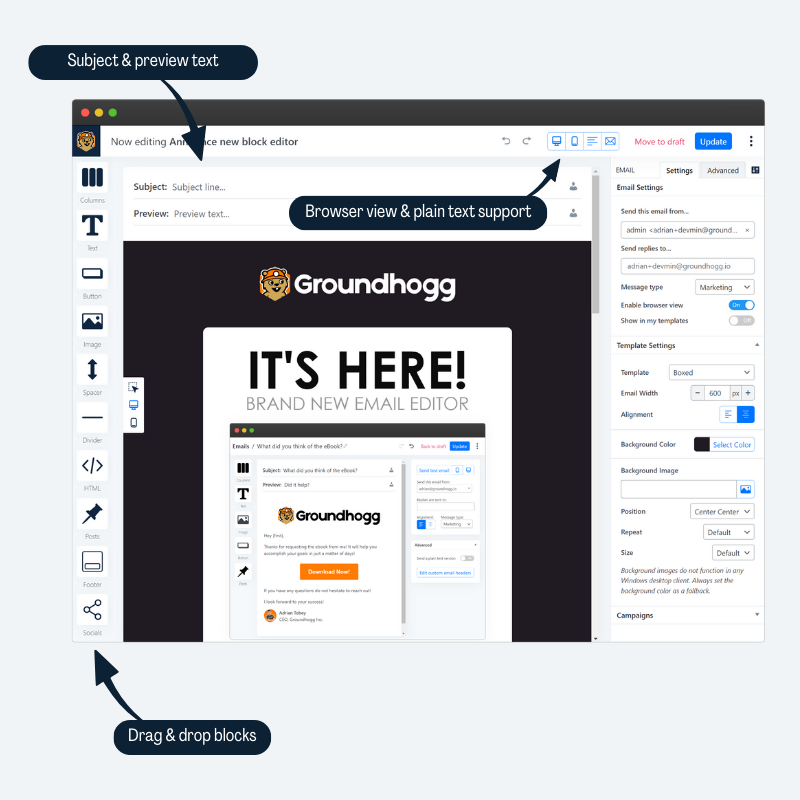
The core plugin includes a contact record with an activity timeline, notes, tasks and unlimited custom fields, tag-based segmentation, CSV import and export, a form builder and a block-based email editor with columns, buttons, images, posts and social blocks. Broadcasts can be sent to saved searches and scheduled on a calendar, and the drag-and-drop flow editor builds automations from triggers, actions and logic steps. A preferences centre, data download and consent tracking ship in the free plugin.
Groundhogg sends through whatever mail setup WordPress already has, so pairing it with an SMTP plugin or transactional provider is strongly recommended. The team’s sister service MailHawk is a paid sending option.
Premium is sold as flat-rate annual plans that bundle extensions, billed yearly:
Groundhogg’s main strength is depth of CRM and automation for a one-off annual price with no contact limits, and the core plugin is genuinely usable on its own. The downsides are that many integrations most stores need, including WooCommerce and bounce processing, sit in the $600-a-year Pro plan, there is no built-in popup builder, and deliverability depends on the mail provider you configure. The interface is denser than newsletter-only plugins.
Pick Groundhogg if you want CRM-style contact management and multi-step funnels inside WordPress and are willing to set up proper sending yourself.
Best for: Small businesses and course creators who want a self-hosted CRM with funnel-style automations inside WordPress.
Groundhogg is the most CRM-like option here, with a capable free core covering contacts, flows, broadcasts and a block email editor. Stores and LMS sites will need the Pro plan for the integrations that matter, so budget for that and for a proper sending service.
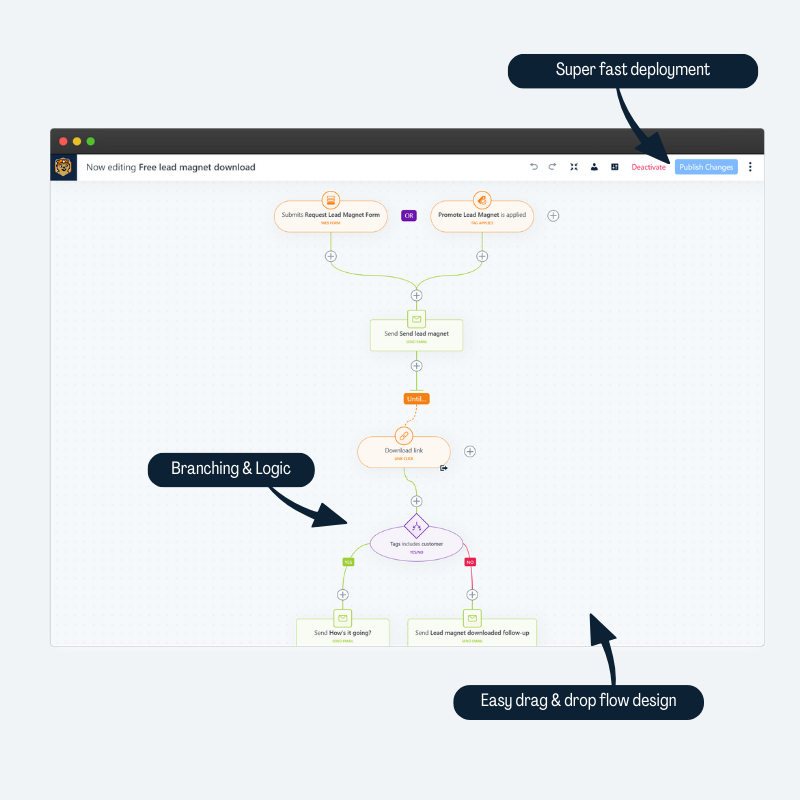
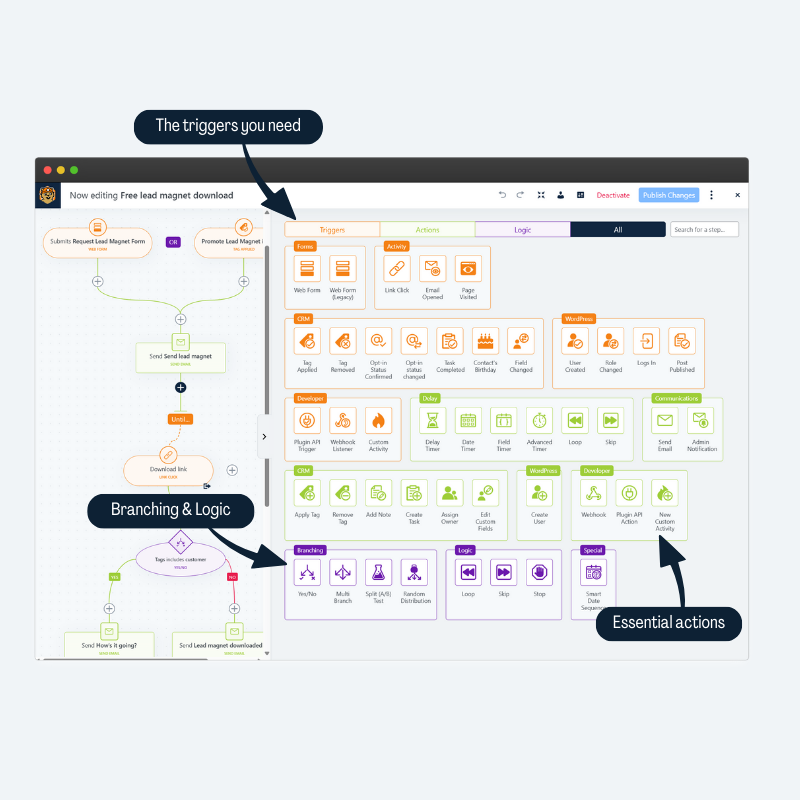
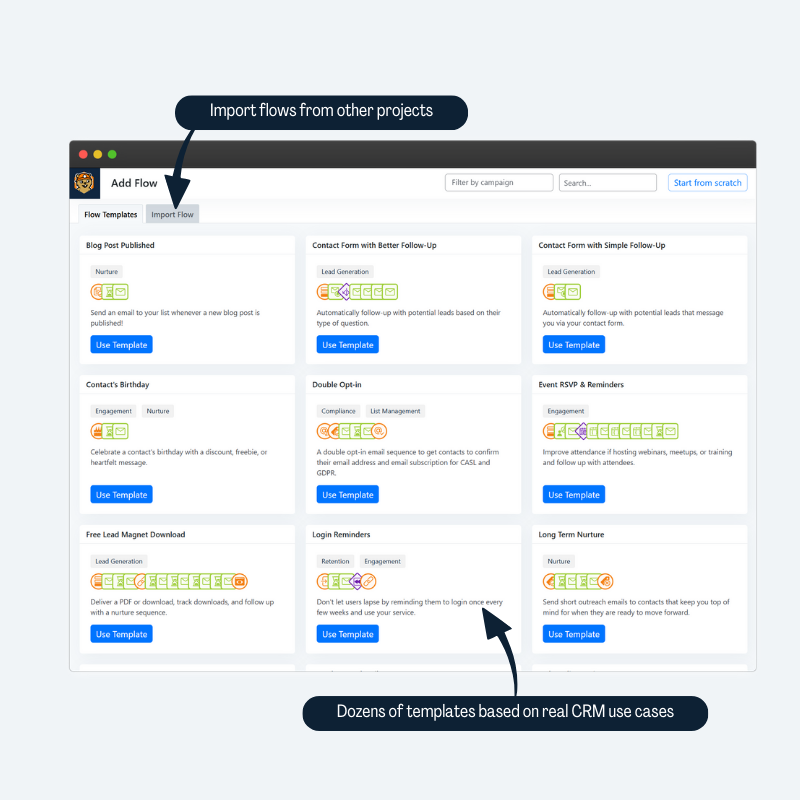
What Groundhogg highlights on its WordPress.org page and its own website, split by version.
25 of 25 features we track in Email Marketing & Newsletters, feature score 97/100
Design newsletters visually without code.
Core includes a block email editor with columns, text, image, button, posts and socials blocks.
Ready-made newsletter and email templates.
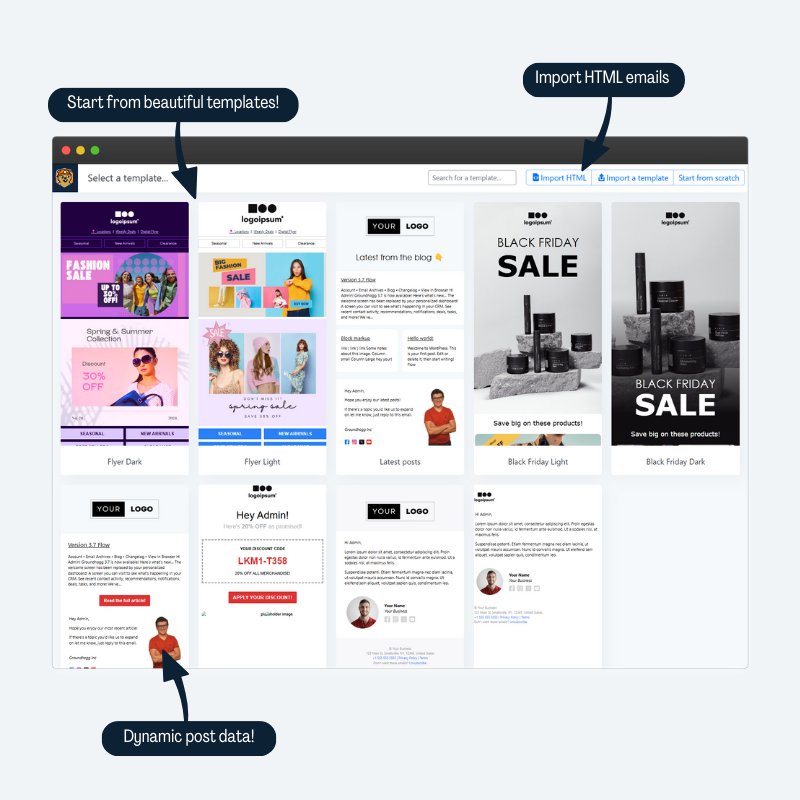
Start from built-in templates or import HTML; template libraries are an Agency extra.
Automatically email subscribers when you publish (RSS to email).
Post Published flow trigger can email contacts on publish; needs the Advanced Features add-on.
Schedule newsletters for a set date and time.
Broadcasts can be scheduled and are shown on a month calendar.
Test subject lines or content variations.
Split (A/B) testing is included from the Basic plan.
Welcome series, drip sequences and trigger-based emails.
Core flows with triggers, actions and delays; conditional logic needs Pro.
Abandoned cart, purchase follow-ups and customer segments from WooCommerce.
WooCommerce integration and cart abandonment are Pro-plan features.
Build workflows on a visual canvas with conditions and delays.
Drag-and-drop flow editor with templates, undo/redo and per-flow metrics.
Automations triggered by membership, course or form events.
Core forms and user-role triggers are free; form-plugin triggers from Plus, LearnDash and MemberPress from Pro.
Embedded, popup or slide-in subscription forms.
Built-in form builder with shortcode block; no popup or slide-in display.
Confirmation emails before subscribers are added.
Confirmation links set an opt-in status that can trigger follow-up flows.
Organise subscribers with lists, tags and dynamic segments.
Tags, saved searches and filters on any contact data.
Store extra data such as birthday or company.
Unlimited CRM custom fields in the core plugin.
Full contact timeline with emails, purchases and activity.
Contact records show activity and email history, notes, tasks and location.
CSV import/export or migration from other services.
CSV import and export of contacts.
Subscribers manage lists or unsubscribe themselves.
Automatic preferences centre with profile, erase and unsubscribe pages.
Contacts and campaigns live in your own WordPress database.
Contacts, emails and flows are stored in your WordPress database.
Use Amazon SES, SendGrid, Mailgun or your own SMTP to send.
Uses your site's mail setup, so any SMTP plugin works; native SES, SendGrid and SMTP integrations need Pro.
Vendor-run sending service included or available.
MailHawk, the team's sending service, is a separate subscription from $10/year.
Detects bounced emails and cleans the list.
Bounce and complaint handling, including IMAP bounce checks, is a Pro-plan feature.
Free plan has no low limit on subscribers or emails.
No vendor limits on contacts, flows or emails; real limits depend on hosting and sender.
Track opens, clicks and unsubscribes per campaign.
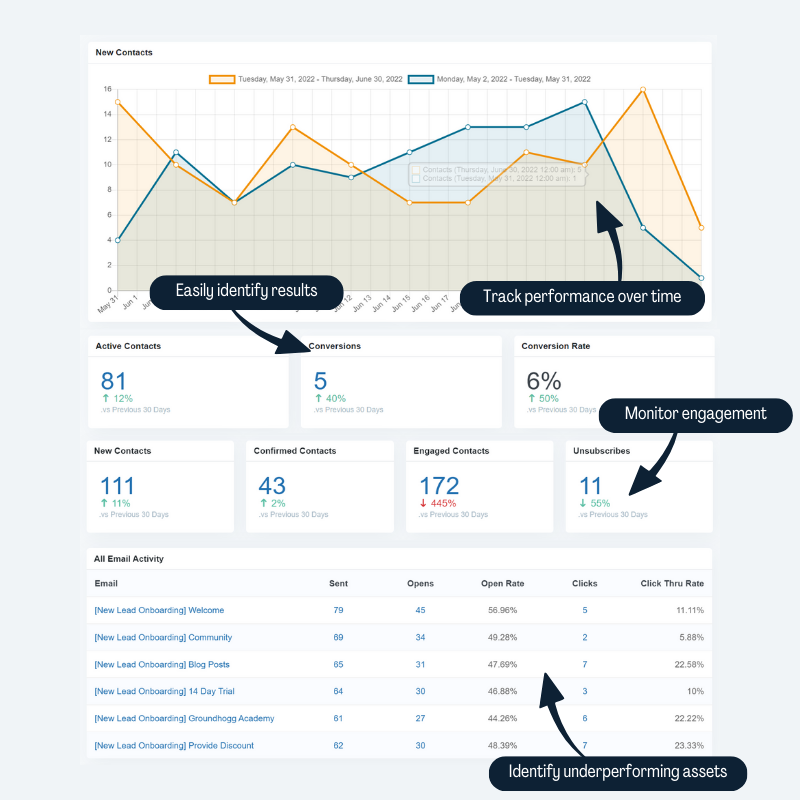
Open, click and conversion reports for broadcasts and flows.
Attributes WooCommerce or other sales to emails.
Ecommerce Impact reporting attributes revenue; requires Pro integrations.
Add subscribers from WPForms, Gravity Forms, Fluent Forms and similar.
WPForms, Gravity Forms, Fluent Forms, CF7 and others are included from Plus.
Consent checkboxes, consent records and data export/erase.
Tracks consent, offers data download and erase, and blocks marketing after consent is withdrawn.
On WordPress.org
Unlimited
Open-source core: CRM, flows, broadcasts, forms and email editor with no contact limits.
1 site
Listed as $20/month billed annually. Split testing, custom fields extension, recurring emails, Zapier, webhooks.
3 sites
Listed as $40/month billed annually. Adds form-plugin integrations, lead scoring, sales pipeline, content restriction.
5 sites
Listed as $50/month billed annually. Adds WooCommerce, LearnDash, MemberPress, cart abandonment, SMTP integrations, bounce handling, SMS.
25 sites
Listed as $100/month billed annually. All add-ons plus white label and template libraries. Newsletter sign-up gives 15% off the first year.
Prices are list prices from the vendor's site, checked 14 Oct 2026. Many vendors discount the first year.
Free installs from WordPress.org, the vendor's own claim, and our estimate of paid installs.
Active installations reported by WordPress.org.
The vendor does not publish a total.
Our estimate, see method below.
How we estimated this: About 2.5K free installs x 8% (the usual share of free sites that also run the paid version when some key features are paid) gives 200. Likely range: 100 to 400. This counts sites running the paid version, including sites whose licence has lapsed. Estimates are rough and based on public figures as of 14 Oct 2026.
1,559 downloads last week, 352.6K all time
| Version | 4.10 |
|---|---|
| Last updated | 29 Oct 2026 (4 days ago) |
| Tested up to | WordPress 7.1.4 |
| Requires | WordPress 6.9+, PHP 7.4+ |
| Support threads (2 months) | 1 of 1 resolved |
| On WordPress.org since | 1 Oct 2018 |
| Refund policy | 14-day money-back (source, 11 Oct 2026) Full refund within 14 days per the pricing page. |
|---|
Self-hosted email marketing and CRM plugin by WPManageNinja: unlimited contacts, campaigns and automation funnels, sending through your own SMTP or ESP.

Newsletter and email automation plugin from Automattic with a drag-and-drop editor, WooCommerce emails and an optional built-in sending service.

Long-running free newsletter plugin by Stefano Lissa with unlimited subscribers, a drag-and-drop composer and paid add-ons for automation and delivery.

Self-hosted newsletter plugin (formerly Email Subscribers) with forms, post notifications and a drag-and-drop editor; Max adds automations and integrations.

Free WordPress connector for the Brevo (formerly Sendinblue) SaaS platform: sign-up forms, contact sync, SMTP and campaigns sent from Brevo.

Lightweight self-hosted newsletter plugin with opt-in forms, new-post emails and automation rules; premium unlocks the visual editor, lists and sequences.
Yes. Groundhogg has a free version on WordPress.org. Paid plans start at $240/yr.
WordPress.org reports 2K+ active installations of the free version. We estimate around 200 sites run the paid version.
Yes: included. Core includes a block email editor with columns, text, image, button, posts and socials blocks.
Yes: paid version (Plus). Post Published flow trigger can email contacts on publish; needs the Advanced Features add-on.
Yes: included. Core flows with triggers, actions and delays; conditional logic needs Pro.
Yes: paid version (Pro). WooCommerce integration and cart abandonment are Pro-plan features.
Yes: partial. Built-in form builder with shortcode block; no popup or slide-in display.
Yes: included. Tags, saved searches and filters on any contact data.
Yes: included. Contacts, emails and flows are stored in your WordPress database.
Yes: included. Open, click and conversion reports for broadcasts and flows.
The core plugin is open source and free with no contact or email limits from the vendor. It includes the CRM, flows, broadcasts, forms and email editor. Premium plans add integrations and advanced steps.
The WooCommerce integration, cart abandonment and ecommerce reporting are in the Pro plan ($50/month billed annually) and Agency.
It uses your existing WordPress mail setup, so an SMTP plugin or a provider such as MailHawk, SendGrid or Amazon SES is strongly recommended. Native SMTP integrations and bounce handling are Pro features.
Yes, using the Post Published trigger in a flow, but that trigger needs the Advanced Features add-on, included from the Plus plan.
Groundhogg offers a 14-day demo sandbox for $1, and paid plans have a 14-day money-back guarantee.
Last updated 11 Oct 2026. Spotted something wrong? Suggest an edit.