



Duplicator
WordPress migration and backup plugin that packages a site into an archive plus standalone installer; Pro adds scheduling, cloud storage and staging.
86

Freemium WordPress backup, restore and migration plugin with scheduled backups to Google Drive, Dropbox, S3 and FTP, plus a Premium tier for agencies.

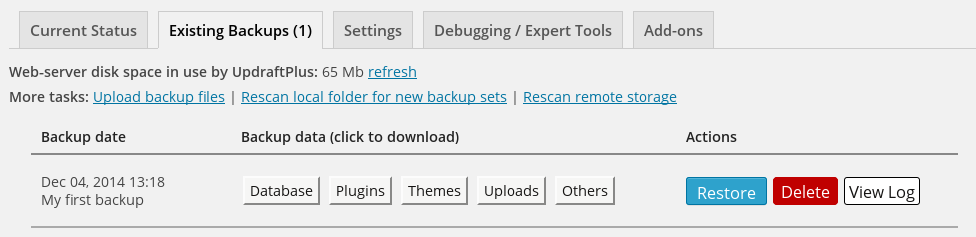
UpdraftPlus is a backup, restore and migration plugin from TeamUpdraft, first released in 2011 and now one of the most widely installed plugins in the WordPress.org directory. It splits each backup into separate archives for the database, plugins, themes, uploads and other content, which makes it easy to restore just one part of a site.
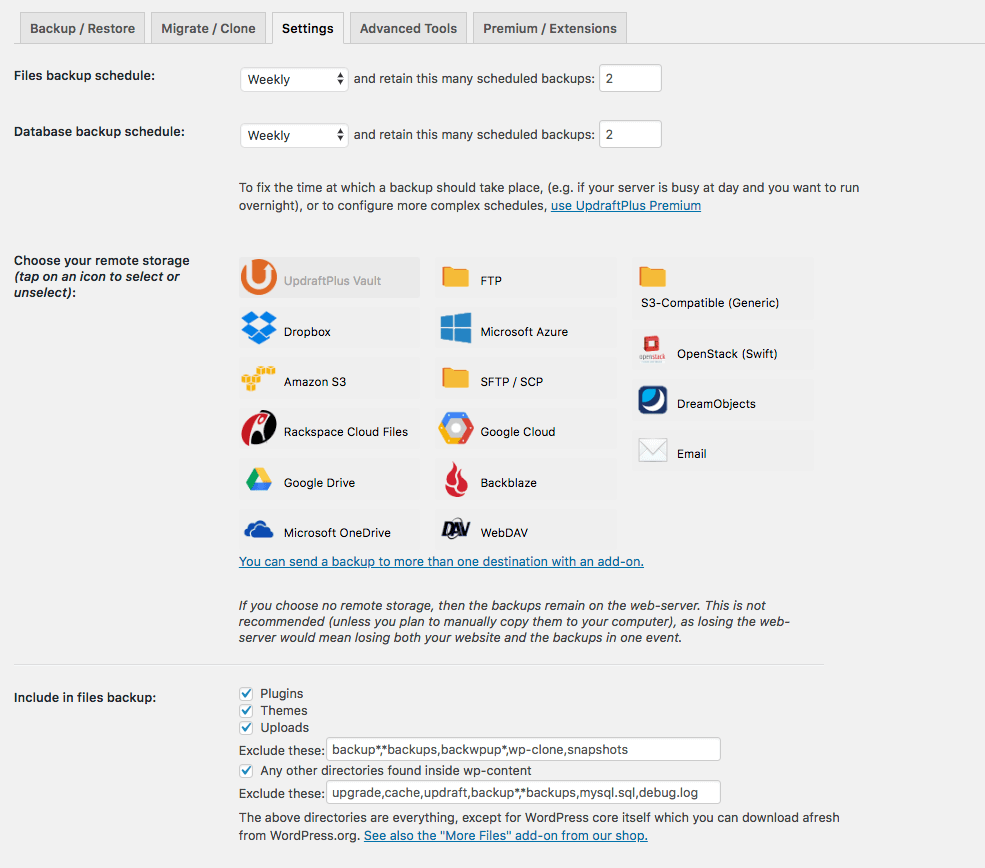
The free version is unusually complete. You can schedule backups every few hours, daily, weekly or monthly, keep a set number of old copies, and send them to Google Drive, Dropbox, Amazon S3 or a generic S3-compatible service, Rackspace, FTP, OpenStack Swift or email. Restores run from the dashboard with a component picker, and since version 1.23.8 basic migration is free too: you restore a backup on the new site and the built-in search-and-replace rewrites URLs.
UpdraftVault is TeamUpdraft’s own storage service and can also be bought on its own by free users. UpdraftCentral, a separate plugin, lets you manage backups and updates across many sites from one dashboard.
Restoring requires a working WordPress install with UpdraftPlus active; there is no standalone restore tool for a site that will not load. There is no real-time backup, no white-label option and no built-in staging-and-push workflow: UpdraftClone creates temporary cloud copies paid for with tokens, and pushing changes back is a manual selective restore. Multisite and WP-CLI also need Premium.
Who it suits: most single-site owners can run the free version indefinitely, while freelancers and agencies get good value from Premium because even the larger licences are inexpensive per site.
Best for: Site owners who want reliable scheduled off-site backups for free, and agencies wanting low per-site Premium costs.
UpdraftPlus is the default recommendation for free WordPress backups because scheduling, remote storage and restores all work without paying. Premium is worth it for incremental backups, more destinations and multisite, but anyone needing staging, real-time backups or recovery of a completely broken site should look at tools built for that.


What UpdraftPlus highlights on its WordPress.org page and its own website, split by version.
20 of 23 features we track in Backup & Migration, feature score 83/100
Automatic backups on a schedule (daily, weekly and so on).
Free schedules from every 2 hours to monthly; fixed start times need Premium.
Only backs up what changed since the last backup, saving time and space.
Incremental backups are a Premium-only feature.
Backs up changes as they happen, useful for stores with constant orders.
No real-time or continuous backup mode; backups run manually or on schedules.
Database-only or files-only backups, include/exclude folders and tables.
Pick database and/or plugins, themes, uploads with exclusions; extra directories need Premium.
Backups stored on the vendor's own cloud, no separate storage account needed.
UpdraftVault is a paid storage subscription from $35/yr; Premium includes 1GB.
Encrypts backup archives or the database export.
Database encryption is listed as a Premium feature.
Send backups to Google Drive.
Google Drive is a free destination; subfolders require Premium.
Send backups to Dropbox.
Dropbox is a free destination.
Send backups to Amazon S3.
Amazon S3 is a free destination; enhanced S3 options are Premium.
Backblaze B2, Wasabi, DigitalOcean Spaces and other S3-compatible services.
Free supports generic S3-compatible storage; native Backblaze needs Premium.
Send backups to OneDrive.
Microsoft OneDrive is a Premium-only destination.
Send backups to your own server over FTP or SFTP.
FTP is free; SFTP and SCP require Premium.
Restore a backup from the WordPress dashboard.
Restore from the dashboard and choose which components to restore.
Restore from outside WordPress (vendor dashboard or standalone installer) if the site won't load.
Restores need WordPress running with UpdraftPlus installed; no standalone restorer.
Move or clone a site to a new host or domain.
Free migration via backup and restore; direct site-to-site needs Premium.
Rewrites URLs and paths in the database during migration.
Built-in search-and-replace updates URLs during migration in free and Premium.
Create a staging copy to test changes, then push them live.
Premium includes UpdraftClone tokens for temporary cloud clones; no automatic push-to-live.
Back up and restore WordPress multisite networks.
Multisite and multi-network compatibility is Premium-only.
Keep a set number of backups or delete old ones automatically.
Keep a set number of backups free; age-based rules need Premium.
Email reports when backups succeed or fail.
Free sends a basic email report; detailed reports with checksums are Premium.
Manage backups for many sites from one dashboard.
UpdraftCentral is a separate plugin, free self-hosted; Gold plan includes central management.
Run backups and restores from the command line.
WP-CLI support is listed as Premium-only.
Rebrand the plugin for client sites.
No rebranding option; Premium can only lock the settings from other admins.
On WordPress.org
2 sites
All Premium features, 1GB UpdraftVault storage, basic staging allowance; 14-day money-back.
10 sites
Same features as Personal with more sites and a larger staging allowance.
35 sites
Advanced staging allowance; 1GB UpdraftVault.
Unlimited
Unlimited sites; 1GB UpdraftVault.
Unlimited
Adds 50GB UpdraftVault storage and UpdraftCentral central management.
Prices are list prices from the vendor's site, checked 14 Oct 2026. Many vendors discount the first year.
Free installs from WordPress.org, the vendor's own claim, and our estimate of paid installs.
Active installations reported by WordPress.org.
Sites/users claimed on the vendor's website. source
Our estimate, see method below.
How we estimated this: The vendor figure (4M+) is within WordPress.org's rounding of the free installs, so it says nothing about paid sites. About 4.5M free installs x 2.8% (the usual share of free sites that also run the paid version when most features are free, lower for very large free bases) gives 130K. Likely range: 65K to 260K. This counts sites running the paid version, including sites whose licence has lapsed. Estimates are rough and based on public figures as of 14 Oct 2026.
1,490,263 downloads last week, 172.6M all time
| Version | 1.26.14 |
|---|---|
| Last updated | 26 Oct 2026 (8 days ago) |
| Tested up to | WordPress 7.1.4 |
| Requires | WordPress 3.9+ |
| Support threads (2 months) | 40 of 49 resolved |
| On WordPress.org since | 22 May 2012 |
| Founded | 2011 (source, 5 Oct 2026) Version 0.1 released August 2011. |
|---|---|
| Refund policy | 14-day money-back (source, 5 Oct 2026) |
WordPress migration and backup plugin that packages a site into an archive plus standalone installer; Pro adds scheduling, cloud storage and staging.

Free WordPress backup, migration and staging plugin with scheduled cloud backups; Pro adds incremental backups, push-to-live staging and white label.

Job-based WordPress backup plugin from WP Media with free scheduling to Dropbox, S3, FTP and Azure; Pro adds Google Drive, encryption and…

Paid SaaS backup service for WordPress with off-site incremental backups, real-time WooCommerce sync, staging and migration from one dashboard.

Freemium WordPress backup, restore and migration plugin from Softaculous with local, FTP and Google Drive storage free and more destinations in Pro.

Site export and import plugin by ServMask that moves a whole WordPress site in one .wpress file; paid extensions add unlimited size,…
Yes. UpdraftPlus has a free version on WordPress.org. Paid plans start at $70/yr.
WordPress.org reports 4M+ active installations of the free version. The vendor claims 4M+ sites in total. We estimate around 130K sites run the paid version.
Yes: included. Free schedules from every 2 hours to monthly; fixed start times need Premium.
Yes: paid version (Personal). Incremental backups are a Premium-only feature.
Yes: included. Restore from the dashboard and choose which components to restore.
Yes: included. Free migration via backup and restore; direct site-to-site needs Premium.
For many single sites, yes. It includes scheduled backups, remote storage on Google Drive, Dropbox, S3 and FTP, one-click restores and basic migration. Premium adds incremental backups, more destinations, encryption, multisite and WP-CLI.
Yes. Since version 1.23.8 you can restore a backup from one site onto another and the search-and-replace engine updates the URLs. Direct site-to-site transfer and selective migration still need Premium.
It is TeamUpdraft's own cloud storage for UpdraftPlus backups. Premium includes 1GB, and both free and Premium users can buy larger quotas starting at 5GB for $35 per year.
Not directly. You need a working WordPress install with UpdraftPlus to upload and restore the backup sets, so a broken site usually means reinstalling WordPress first.
Last updated 5 Oct 2026. Spotted something wrong? Suggest an edit.