

Advanced Database Cleaner
Freemium WordPress database cleaner with previews, keep-last-X-days rules, scheduled tasks and table tools; Premium adds orphan detection.
89

Meow Apps' database cleaner for large sites: core cleanup, table, option and cron browsers with ownership hints, and a Pro background sweeper.

Database Cleaner by Jordy Meow (Meow Apps, also behind Media Cleaner and AI Engine) is a newer take on WordPress database housekeeping, built with large databases in mind. Heavy jobs are split into small asynchronous batches so cleanups and size calculations do not hit PHP time limits, and the plugin records database size over time so you can see what is growing.
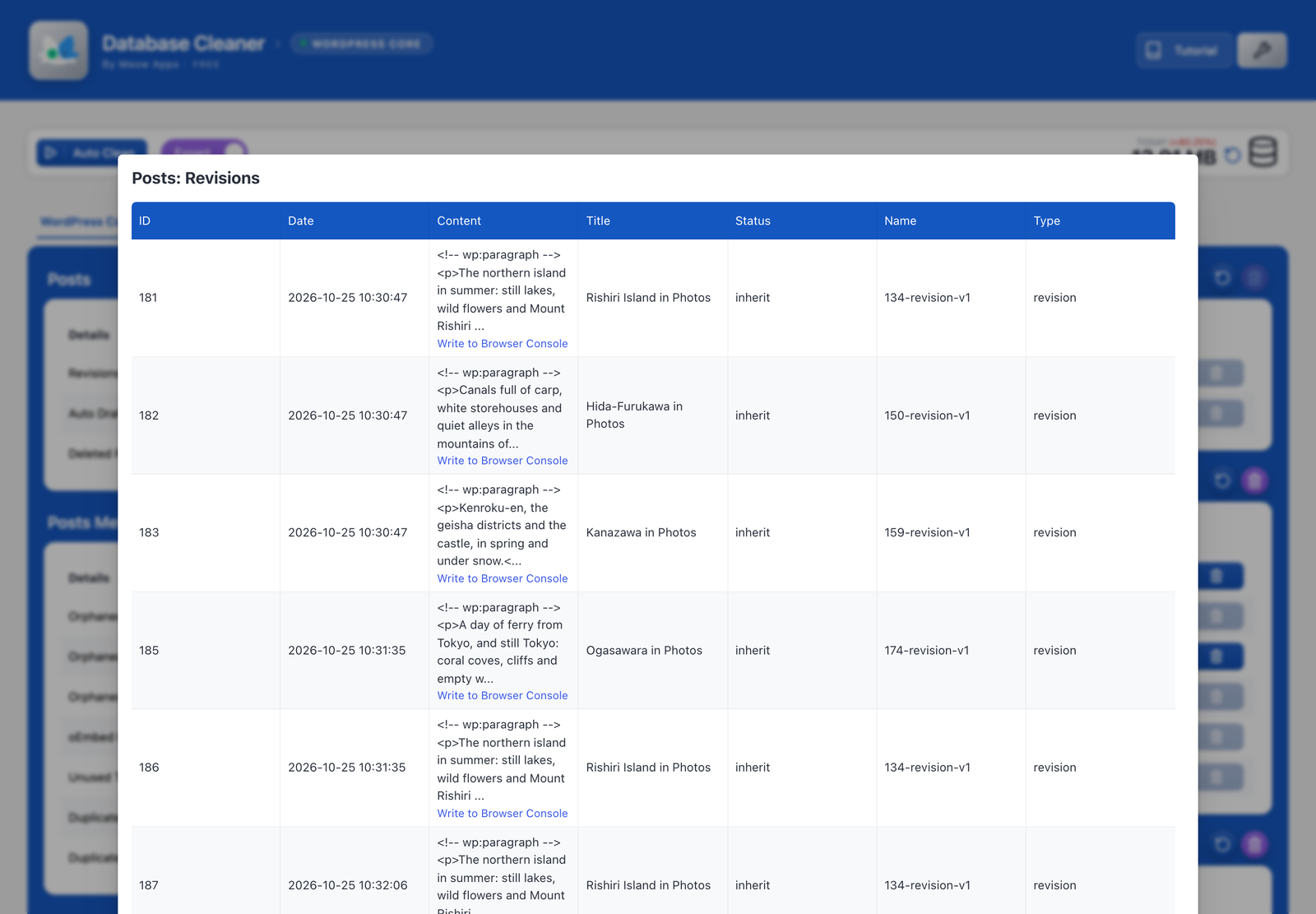
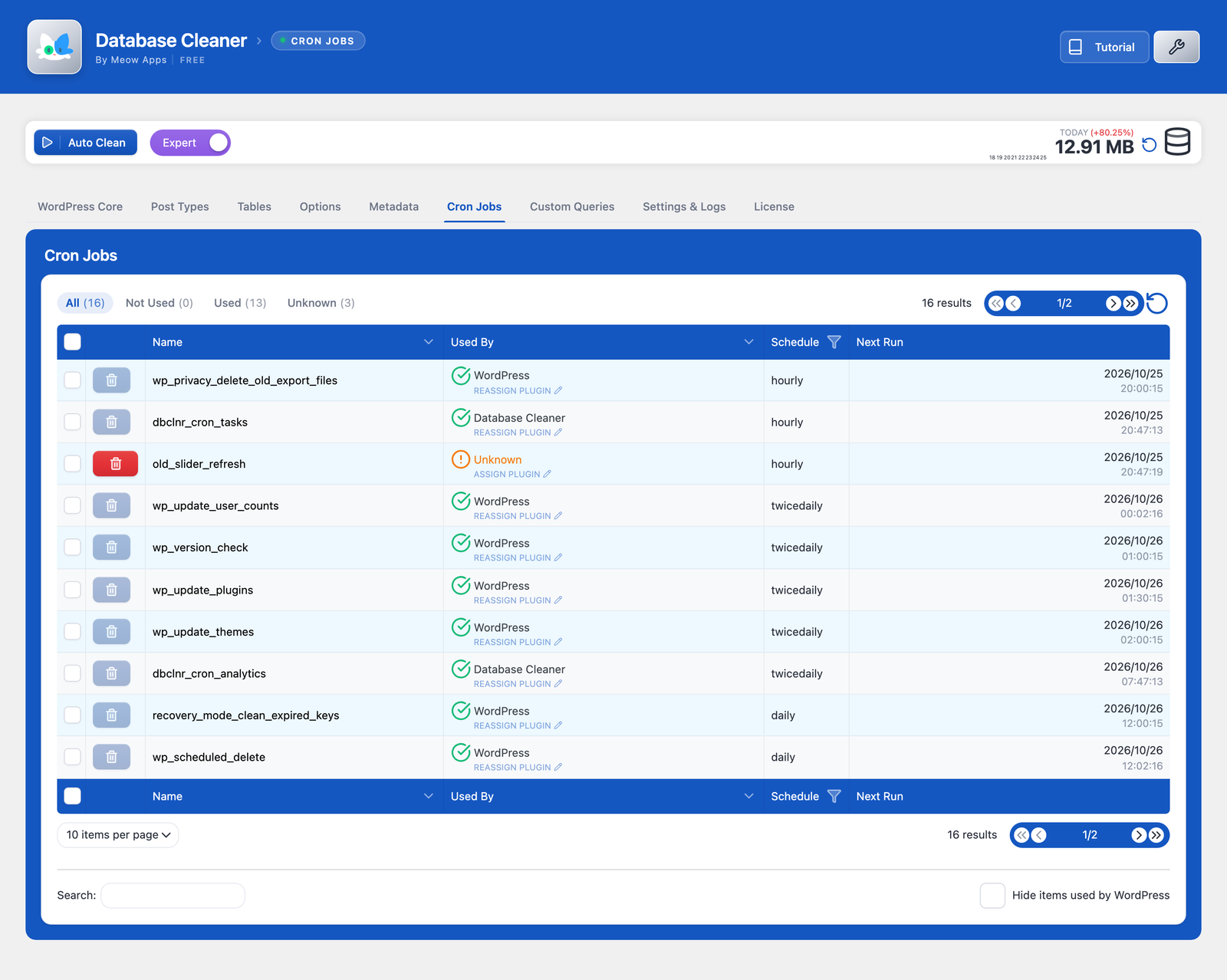
The interface has an Easy Mode with a single Auto Clean button and an Expert Mode with tabs for WordPress core items, post types, tables, options, cron jobs and metadata. Core items include revisions, auto-drafts, deleted posts, spam, trashed and unapproved comments, pingbacks, orphaned and duplicated post, term, user and comment meta, orphaned term relationships, unused terms, oEmbed caches and expired or all transients. Each item can be set to Auto, Manual or Never, shows a count you can inspect, and respects an age threshold (seven days by default) so recent data is kept.
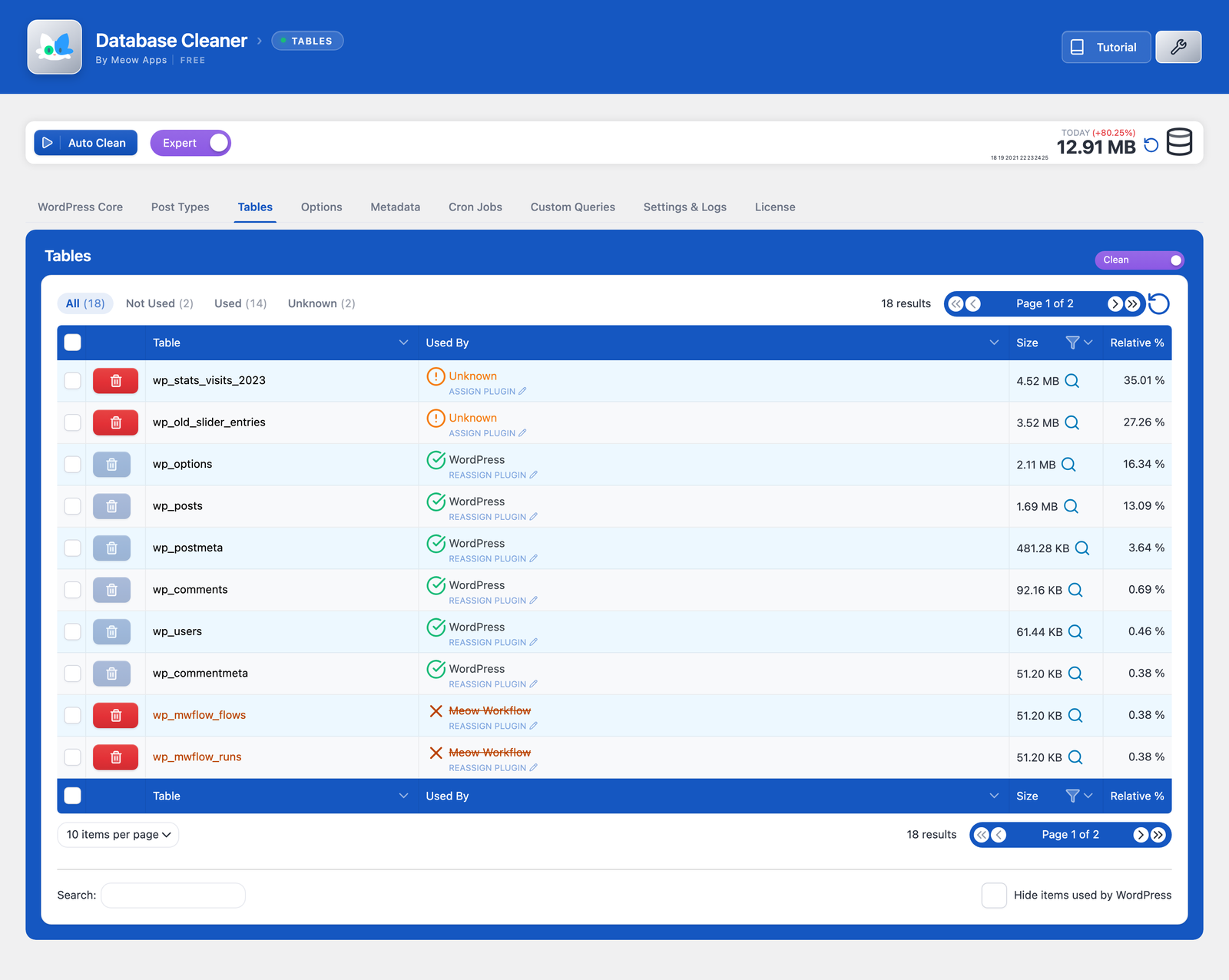
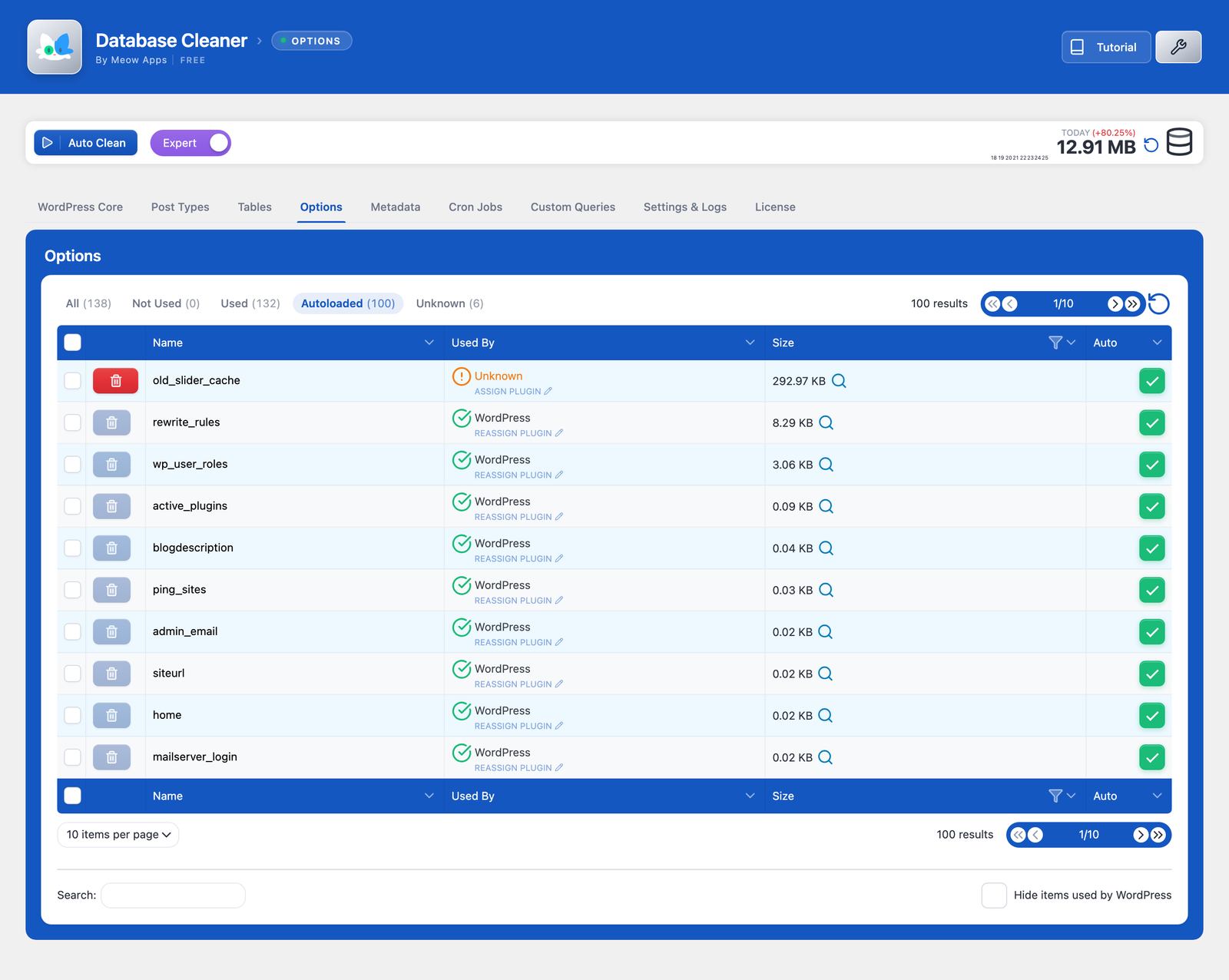
The tables tab shows every table’s size, flags tables not used by anything active, and can optimise, repair or delete them, with WordPress core tables protected. The options tab lets you inspect values, delete unused entries and switch autoload off. An optional integration with AI Engine exposes MCP tools so an AI assistant can review and clean the database with you confirming each step.
The free version recognises WordPress core and common plugins. Pro adds a curated map that links around 5,300 tables, 59,000 options, 1,800 cron jobs and 1,500 post types to the plugin or theme that registers them, plus the Nyao Sweeper, which cleans automatically in the background on a schedule. Pro costs $39 a year for one site, $59 for five or $99 for twenty, with lifetime licences from $249.
Who should pick it: owners of large or long-lived sites who want to see which plugin owns each table and option and clean in safe batches.
Best for: Large or long-lived sites that need to find out which plugin owns each table and option and clean in safe batches.
Database Cleaner is a modern, well-maintained option whose batched processing and ownership hints suit big databases. The free version handles core cleanup and table/option management well, but automation and the full plugin-ownership map require Pro, and there is no Action Scheduler or command-line support.

What Database Cleaner highlights on its WordPress.org page and its own website, split by version.
17 of 22 features we track in Database Optimization, feature score 79/100
Delete old post and page revisions.
Revisions are a core cleanup item, filtered by the age threshold.
Remove auto-drafts and emptied trash.
Auto-drafts and deleted (trashed) posts are core cleanup items.
Delete spam, trashed and unapproved comments.
Cleans spam, deleted and unapproved comments, plus pingbacks manually.
Remove expired (or all) transients.
Expired transients auto-clean; all transients can be removed manually.
Remove post, comment, user and term meta with no parent.
Removes orphaned and duplicated post, term, user and comment meta and term relationships.
Find and delete tables left behind by removed plugins.
Tables tab flags tables not used by active code and can delete them; Pro improves attribution.
Find options and scheduled tasks left by removed plugins.
Flags unused options and lists cron jobs for deletion; Pro recognises far more plugins.
Clean WooCommerce Action Scheduler completed actions and logs.
No Action Scheduler item among the cleanup types.
Run OPTIMIZE TABLE to reclaim space and defragment tables.
Optimise action for selected tables.
Repair corrupted or crashed tables.
Repair tables action, added in 0.7.5.
See the size of autoloaded options and switch heavy ones off.
Options tab shows the autoload flag and lets you switch autoload off per option.
Convert MyISAM tables to InnoDB.
No storage-engine conversion feature.
Cap how many revisions WordPress keeps from now on.
Cleans existing revisions only; no cap on future revisions.
Run cleanups automatically on a schedule.
Nyao Sweeper runs background cleaning on a schedule in Pro.
Shows counts or the exact items before anything is removed.
Counts per item, an inspect view of the related rows and a confirmation modal before deleting.
Keep the last X days or revisions when cleaning.
Age threshold (default 7 days) skips entries newer than the set period.
Built-in or integrated backup before running a cleanup.
No backup feature; the readme says to back up before use.
Exclude specific tables, options or items from cleanup.
Items can be set to Never and core tables are protected; no custom exclusion list.
Shows table sizes and how much space a cleanup will save.
Shows each table's size and a database size history chart.
Shows which plugin or theme created each table or option.
Free attributes core and common plugins; Pro maps ~5,300 tables and ~59,000 options to owners.
Clean and optimise across a multisite network.
Changelog notes improved multisite support, but network-wide cleaning is not documented.
Run cleanups from the command line.
No WP-CLI commands are registered or documented.
On WordPress.org
Unlimited
WordPress.org version: core cleanup, tables, options, cron and post type tools.
1 site
Pro features: plugin ownership map and Nyao Sweeper background cleaning.
5 sites
Also sold as Standard Life: $249 one-time for 5 sites.
20 sites
Also sold as Professional Life: $399 one-time for 20 sites.
500 sites
Lifetime updates; support covers the first year only.
2500 sites
Lifetime updates; support covers the first year only.
Prices are list prices from the vendor's site, checked 14 Oct 2026. Many vendors discount the first year.
Free installs from WordPress.org, the vendor's own claim, and our estimate of paid installs.
Active installations reported by WordPress.org.
The vendor does not publish a total.
Our estimate, see method below.
How we estimated this: About 15K free installs x 4% (the usual share of free sites that also run the paid version when most features are free) gives 600. Likely range: 300 to 1.2K. This counts sites running the paid version, including sites whose licence has lapsed. Estimates are rough and based on public figures as of 14 Oct 2026.
13,147 downloads last week, 561.8K all time
| Version | 1.4.8 |
|---|---|
| Last updated | 30 Oct 2026 (3 days ago) |
| Tested up to | WordPress 7.1.4 |
| Requires | WordPress 6.0+, PHP 8.1+ |
| Support threads (2 months) | 2 of 2 resolved |
| On WordPress.org since | 1 Dec 2021 |
| Refund policy | 14-day refund on request (source, 11 Oct 2026) No trials; refunds given if requested within 2 weeks. |
|---|
Freemium WordPress database cleaner with previews, keep-last-X-days rules, scheduled tasks and table tools; Premium adds orphan detection.

Free all-in-one plugin from TeamUpdraft combining page caching, image compression with WebP, database cleanup and minification.

Free server-level cache and optimisation suite from LiteSpeed Technologies; full-page caching needs a LiteSpeed web server or QUIC.cloud CDN.

Free one-click database optimiser that deletes revisions (keeping the newest if you like), trash, spam and transients, with scheduling and multisite support.

Premium all-in-one caching and performance plugin for WordPress that applies page caching, file optimisation and lazy loading as soon as it is…

Free, settings-free database sweeper by Lester Chan that removes revisions, orphaned meta and junk using WordPress's own delete functions, with WP-CLI.
Yes. Database Cleaner has a free version on WordPress.org. Paid plans start at $39/yr.
WordPress.org reports 10K+ active installations of the free version. We estimate around 600 sites run the paid version.
Yes: included. Revisions are a core cleanup item, filtered by the age threshold.
Yes: included. Expired transients auto-clean; all transients can be removed manually.
Yes: included. Removes orphaned and duplicated post, term, user and comment meta and term relationships.
Yes: included. Tables tab flags tables not used by active code and can delete them; Pro improves attribution.
Yes: included. Optimise action for selected tables.
Yes: included. Options tab shows the autoload flag and lets you switch autoload off per option.
Yes: paid version (Starter). Nyao Sweeper runs background cleaning on a schedule in Pro.
Pro adds a curated map that links thousands of tables, options, cron jobs and post types to the plugin or theme that created them, so leftovers are easier to spot, plus the Nyao Sweeper for automatic background cleaning.
No. Database Cleaner (WordPress.org slug database-cleaner) is made by Meow Apps; Advanced Database Cleaner is a separate plugin by SigmaPlugin. Meow Apps publishes its own comparison of the two.
That is its design focus: it deletes in small batches over asynchronous requests to avoid PHP timeouts, and the batch size can be adjusted in settings.
Annual licences are $39 (1 site), $59 (5 sites) and $99 (20 sites). Lifetime licences run from $249 (5 sites) to $799 (2,500 sites), with support for the first year. Refunds are given if requested within two weeks.
Last updated 11 Oct 2026. Spotted something wrong? Suggest an edit.