
Wordfence Security
Endpoint firewall, malware scanner and login security plugin for WordPress, with paid tiers for real-time threat data and hands-on incident response.
80

Free WordPress security plugin from TeamUpdraft covering login protection, firewall rules, file checks and an audit log, with a low-cost Premium upgrade.
All-In-One Security (AIOS) is a free security plugin maintained by TeamUpdraft, the company behind UpdraftPlus. It takes a checklist approach: dozens of individual protections are grouped into sections, and a security points meter shows how many you have switched on. Almost everything runs inside WordPress or through .htaccess rules on your server.
Login security is the strongest area. You can limit login attempts, add math CAPTCHA, Google reCAPTCHA or Cloudflare Turnstile to login, registration, comments and WooCommerce forms, rename the login page, enforce strong passwords and check them against Have I Been Pwned, and require two-factor authentication through authenticator apps. An active-sessions screen lets you see logged-in users and force them out.
Premium starts at $89 a year for two sites (half price in the first year) and adds automatic malware scanning with search-engine blacklist checks, uptime and response-time monitoring, country blocking for the whole site or individual pages, Smart 404 blocking of probing bots, and extra 2FA options such as emergency codes, trusted-device frequency and integrations with WooCommerce, Elementor Pro and other login forms. Premium also gives ticket-based support and malware removal advice.
There is no vulnerability scanner, virtual patching or automatic updating of vulnerable plugins, and the firewall rules are static rather than fed by a live threat-intelligence service. The free file scanner reports changes since the last scan rather than comparing files with the official originals. The sheer number of options can overwhelm beginners, and some rules can conflict with other plugins if enabled carelessly.
AIOS is a good fit for budget-conscious owners and agencies who want broad login and hardening controls for free, and an inexpensive multi-site upgrade for malware scanning and country blocking.
Best for: Budget-conscious site owners and agencies who want extensive free login, firewall and hardening controls with an inexpensive upgrade path.
AIOS packs more free login and hardening options than most competitors, and Premium is cheap for multiple sites. It lacks vulnerability scanning and live threat intelligence, so pair it with a vulnerability alert service or choose a rival if those matter most.
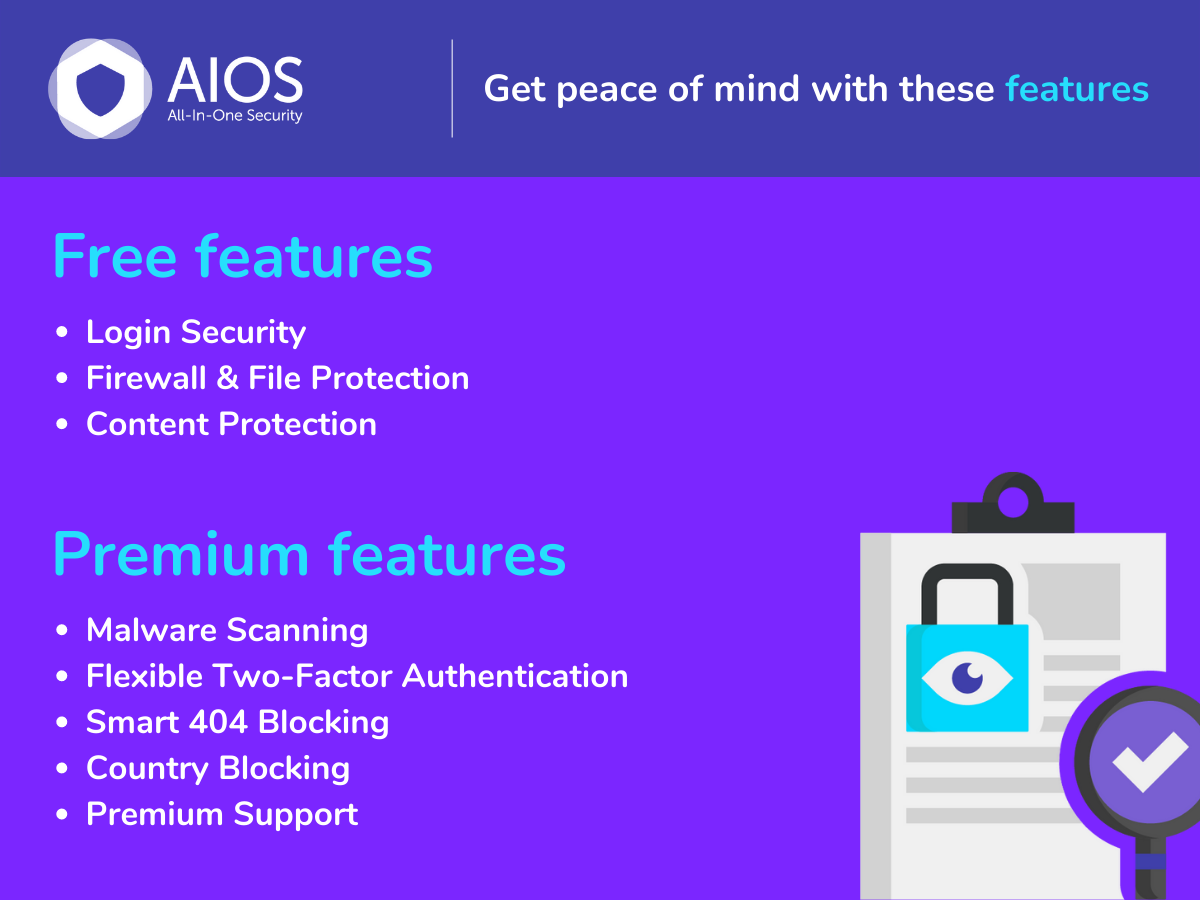
What All-In-One Security (AIOS) highlights on its WordPress.org page and its own website, split by version.
17 of 26 features we track in Security Plugins, feature score 61/100
Filters malicious requests (SQL injection, XSS and similar) before they reach WordPress.
PHP and .htaccess firewall with 6G/8G rules, XSS and XML-RPC protection.
Firewall runs on the vendor's network in front of your server, not inside WordPress.
All rules run on your own server.
Limits failed logins and locks out attackers guessing passwords.
Limits failed logins with configurable lockouts.
CAPTCHA or Turnstile on login, registration and password reset forms.
Math CAPTCHA, reCAPTCHA or Turnstile on login, registration, reset and more.
Throttles or blocks aggressive crawlers and bad bots.
Free blocks fake Googlebots and blank-UA POSTs; Smart 404 bot blocking is Premium.
Block or allow traffic by country.
Block countries site-wide or on chosen pages, with IP whitelisting.
Blocks IPs known for attacks using shared threat intelligence.
Manual IP and user-agent blacklists only; no shared threat-intel feed.
Scans files and database for malware, backdoors and injected code.
Automatic malware scans with search-engine blacklist checks.
Compares core, plugin and theme files with originals and flags changes.
File change scanner reports changes since the last scan, not against originals.
Warns when installed plugins, themes or core have known vulnerabilities.
No vulnerability database or plugin/theme vulnerability checks.
Runs scans automatically on a schedule.
File change scans can be scheduled; Premium malware scans run automatically.
Scans run on the vendor's servers so they don't slow your site.
Could not confirm where Premium malware scans are processed.
One-click or expert cleanup of infected sites.
Premium includes malware removal advice from experts, not a cleanup service.
Second login factor via authenticator app, email or similar.
TOTP 2FA via Google/Microsoft Authenticator or Authy; advanced options in Premium.
Passwordless login with passkeys or hardware security keys.
No passkey or WebAuthn login option.
Enforce strong passwords, expiry or breached-password checks.
Enforce strong passwords and check against Have I Been Pwned.
Move or hide the wp-login.php / wp-admin login page.
Rename the login page to a custom slug.
View and end active user sessions, limit concurrent logins.
View logged-in users, force individual or bulk logout, auto-logout.
Disable XML-RPC, file editing, user enumeration and similar weak points.
Disable file editing, XML-RPC, user enumeration; protect sensitive files.
Enforce HTTPS, fix mixed content and redirects.
No HTTPS enforcement or mixed-content fixer.
Set HSTS, CSP, X-Frame-Options and other HTTP security headers.
Limited header protections such as frame blocking; no full header manager.
Firewall rules that block exploits for known plugin vulnerabilities before an update is available.
Static rule sets only; no rules for specific plugin vulnerabilities.
Automatically updates plugins with known vulnerabilities.
Does not auto-update vulnerable plugins.
Records logins, changes and admin actions for auditing.
Audit log of logins, plugin/theme changes and core updates, CSV export.
Email or app alerts for attacks, lockouts and scan results.
Email notifications for file changes and lockouts; Premium uptime alerts.
Manage security for many sites from one dashboard.
No multi-site security dashboard documented.
On WordPress.org
2 sites
First year $44.50.
10 sites
First year $74.50.
35 sites
First year $124.50.
Unlimited
First year $174.50.
Prices are list prices from the vendor's site, checked 14 Oct 2026. Many vendors discount the first year.
Free installs from WordPress.org, the vendor's own claim, and our estimate of paid installs.
Active installations reported by WordPress.org.
Sites/users claimed on the vendor's website. source
Our estimate, see method below.
How we estimated this: The vendor figure (1M+) is within WordPress.org's rounding of the free installs, so it says nothing about paid sites. About 1.5M free installs x 2.8% (the usual share of free sites that also run the paid version when most features are free, lower for very large free bases) gives 42K. Likely range: 21K to 84K. This counts sites running the paid version, including sites whose licence has lapsed. Estimates are rough and based on public figures as of 14 Oct 2026.
719,414 downloads last week, 39.5M all time
| Version | 5.5.1 |
|---|---|
| Last updated | 30 Oct 2026 (4 days ago) |
| Tested up to | WordPress 7.1.4 |
| Requires | WordPress 5.3+, PHP 7.4+ |
| Support threads (2 months) | 11 of 23 resolved |
| On WordPress.org since | 3 Jun 2013 |
| Refund policy | 14-day money-back (source, 5 Oct 2026) |
|---|
 All-In-One Security (AIOS)/Jetpack Protect
 All-In-One Security (AIOS)/Defender Security
 All-In-One Security (AIOS)/Patchstack
 All-In-One Security (AIOS)/WP Cerber Security
 All-In-One Security (AIOS)/Limit Login Attempts Reloaded
 All-In-One Security (AIOS)/MalCare Security
 All-In-One Security (AIOS)/Shield SecurityAll-In-One Security (AIOS)/Wordfence Security
 All-In-One Security (AIOS)/Kadence Security (formerly Solid Security)
 All-In-One Security (AIOS)/Sucuri Security
 All-In-One Security (AIOS)/Really Simple Security
Endpoint firewall, malware scanner and login security plugin for WordPress, with paid tiers for real-time threat data and hands-on incident response.
Free auditing, file integrity and remote scanning plugin from Sucuri that connects to its paid cloud firewall and malware cleanup platform.
WPMU DEV's WordPress security plugin with malware scanning, AntiBot firewall, 2FA with passkeys, hardening and audit logs; Pro adds scheduled scans.
Automated WordPress security plugin with firewall, silentCAPTCHA bot detection, 2FA and audit log; ShieldPRO adds malware and vulnerability scanning.
Cloud-scanning WordPress security plugin with a plugin-level firewall, login protection and paid one-click malware cleanup, for site owners and agencies.
Login-focused WordPress security plugin (formerly Solid Security / iThemes Security) with 2FA, brute-force protection and Patchstack virtual patching in Pro.
Yes. All-In-One Security (AIOS) has a free version on WordPress.org. Paid plans start at $89/yr.
WordPress.org reports 1M+ active installations of the free version. The vendor claims 1M+ sites in total. We estimate around 42K sites run the paid version.
Yes: included. PHP and .htaccess firewall with 6G/8G rules, XSS and XML-RPC protection.
Yes: included. Limits failed logins with configurable lockouts.
Yes: paid version (Personal). Automatic malware scans with search-engine blacklist checks.
No: not included. No vulnerability database or plugin/theme vulnerability checks.
Yes: included. TOTP 2FA via Google/Microsoft Authenticator or Authy; advanced options in Premium.
Yes: included. Audit log of logins, plugin/theme changes and core updates, CSV export.
Automatic malware scanning with blacklist checks, uptime monitoring, country blocking, Smart 404 blocking, advanced 2FA options and ticket support.
Yes. The free version offers Turnstile, Google reCAPTCHA or a simple math CAPTCHA on login, registration, password reset, comments and supported form plugins.
No. AIOS has no vulnerability database or scanner, so you will need a separate service if you want alerts about known plugin vulnerabilities.
Renewal prices are $89 for 2 sites, $149 for 10, $249 for 35 and $349 for unlimited sites per year, with 50% off the first year.
Last updated 5 Oct 2026. Spotted something wrong? Suggest an edit.