
LiteSpeed Cache
Free server-level cache and optimisation suite from LiteSpeed Technologies; full-page caching needs a LiteSpeed web server or QUIC.cloud CDN.
94

Automattic's one-click speed plugin: page cache, critical CSS, deferred JS, concatenation and an image CDN. Paid tier automates critical CSS.

Jetpack Boost is a standalone performance plugin from Automattic, the company behind WordPress.com and Jetpack. It does not require the main Jetpack plugin and is built around a short list of toggle-based modules aimed at Core Web Vitals, with a speed score from Google PageSpeed shown on its dashboard.
The free version includes a disk-based page cache (via advanced-cache.php) for logged-out visitors, with automatic clearing when content changes, URL exclusions and a default one-hour lifetime. It respects WordPress’s DONOTCACHEPAGE signal, which WooCommerce uses on cart and checkout pages. On hosts that run their own page cache, such as WordPress.com and other WP Cloud hosts, the module steps aside. Other modules include Optimize CSS Loading (critical CSS), Defer Non-Essential JavaScript, concatenate and minify JS and CSS, the Image CDN (resized, modern-format images served from Jetpack’s network), Optimize LCP Images, prerendering of Cornerstone Pages via speculation rules, and an Image Guide overlay that flags oversized images.
On the free plan, critical CSS must be regenerated manually after theme or content changes, and Cornerstone Page and LCP optimisations apply to one page. The paid Boost plan regenerates critical CSS automatically, extends those optimisations to up to ten pages, adds performance history charts, per-format image quality controls on the CDN and priority support. Boost is also included in the Jetpack Complete bundle.
The module list is deliberately short: there is no separate mobile cache, cache preloading, browser-cache header management, database cleanup, Heartbeat control, font optimisation, third-party CDN rewriting or Cloudflare integration, and the old lazy-load module has been retired in favour of WordPress’s native lazy loading. Some features rely on a WordPress.com connection, and the paid plan costs more than several full-featured competitors.
Who should pick it: site owners who want a simple, low-maintenance speed plugin from a trusted vendor, especially those already using Jetpack or hosting on WordPress.com/WP Cloud, rather than power users who want granular control.
Best for: Non-technical site owners and Jetpack users who want a few safe, high-impact speed optimisations with minimal configuration.
Jetpack Boost is easy to use and the free tier, with page cache, critical CSS and an image CDN, is genuinely useful. Its narrow feature set and pricey upgrade mean power users will find more control and value elsewhere.
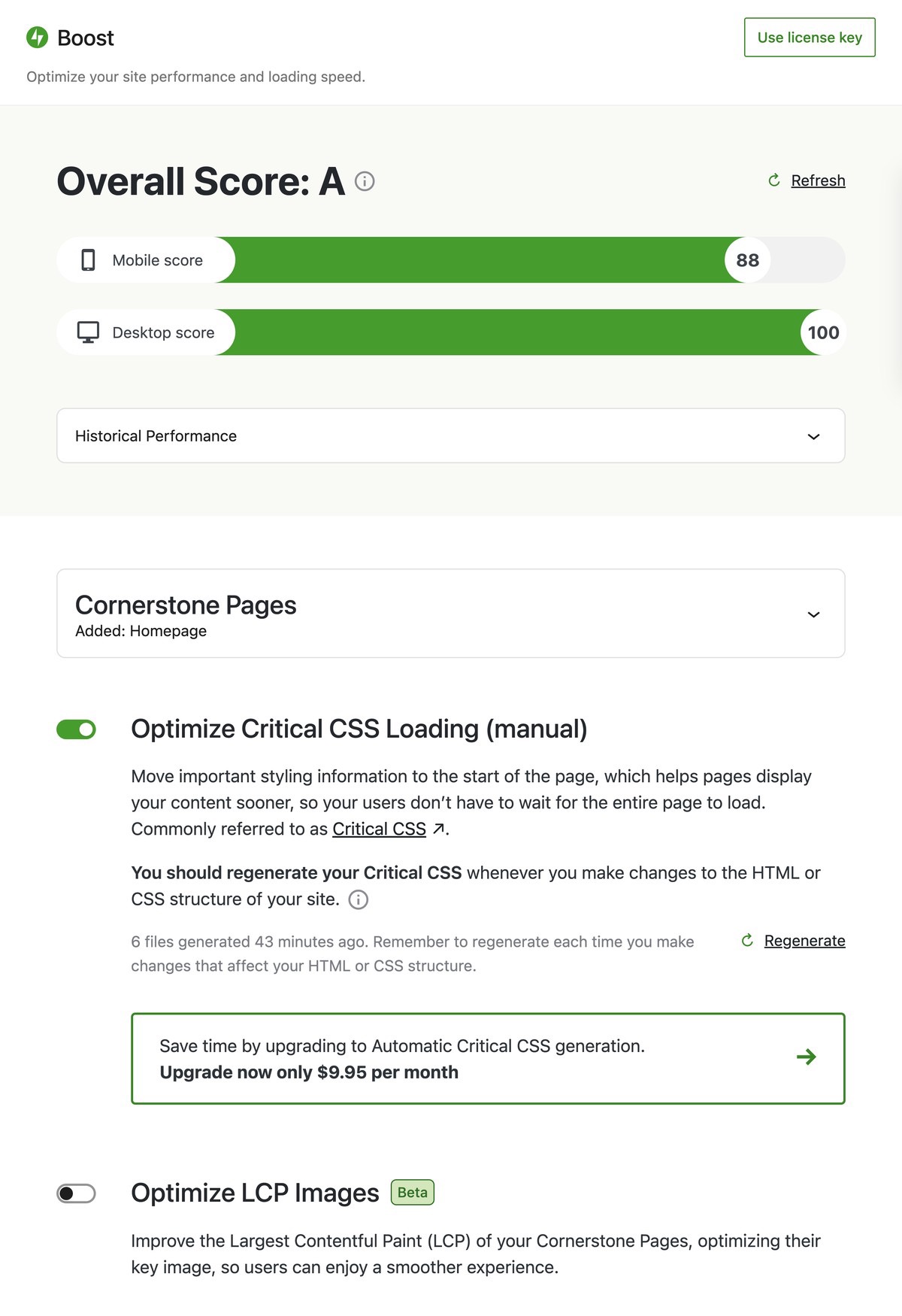


What Jetpack Boost highlights on its WordPress.org page and its own website, split by version.
12 of 25 features we track in Caching & Speed, feature score 49/100
Serves pre-built HTML pages.
Disk-based static page cache for logged-out visitors.
Sets cache headers for static files.
Does not manage browser cache headers.
Builds the cache before visitors arrive.
No cache preloading; pages cache on first visit.
Redis or Memcached object caching.
No Redis/Memcached integration.
Different cache for mobile devices.
No separate mobile cache.
Excludes cart, checkout and account pages automatically.
Honours DONOTCACHEPAGE, which WooCommerce sets on cart/checkout; URL exclusions too.
Page caching works on Apache, Nginx and LiteSpeed alike.
Works on most hosts; cache toggle hidden where the host runs its own page cache.
Works on WordPress multisite networks.
No documentation found on multisite network support.
Strips whitespace from CSS and JavaScript.
Concatenate and minify CSS and JS modules.
Merges CSS/JS files.
Concatenates JS and CSS files to reduce requests.
Loads scripts after the page renders or on interaction.
Defers non-essential JavaScript until after load.
Generates only the CSS each page uses.
No unused CSS removal.
Inlines above-the-fold CSS.
Manual generation free; automatic regeneration on paid plan.
Self-hosts or preloads web fonts.
No font optimisation module.
Preload fonts, images or links and prefetch DNS.
Prerenders Cornerstone Pages and optimises LCP images; no manual hint controls.
Defers off-screen images and iframes.
Lazy-load module deprecated; relies on WordPress native lazy loading.
Compresses uploaded images.
Image CDN resizes and compresses images; quality controls on paid plan.
Serves next-gen image formats.
Image CDN serves modern formats such as WebP.
Rewrites asset URLs to a CDN.
No option to rewrite assets to a third-party CDN.
Purges or configures Cloudflare.
No Cloudflare integration.
Replace YouTube and Vimeo embeds with a lightweight preview.
No video embed placeholder feature.
A CDN is part of the product or plan, not just URL rewriting.
Jetpack-run Image CDN for images only, free.
Removes revisions, transients and spam.
No database cleanup.
Limits the WordPress Heartbeat API.
No Heartbeat control.
Clear or warm the cache from the command line.
wp jetpack-boost commands to toggle modules and manage connection.
On WordPress.org
Unlimited
Free plugin on WordPress.org.
1 site
Listed as $19.95/month billed yearly; first year 50% off ($9.95/month).
Prices are list prices from the vendor's site, checked 14 Oct 2026. Many vendors discount the first year.
Free installs from WordPress.org, the vendor's own claim, and our estimate of paid installs.
Active installations reported by WordPress.org.
The vendor does not publish a total.
Our estimate, see method below.
How we estimated this: About 250K free installs x 5% (the usual share of free sites that also run the paid version when a hosted service whose free tier is generous) gives 13K. Likely range: 6.5K to 26K. This counts sites running the paid version, including sites whose licence has lapsed. Estimates are rough and based on public figures as of 14 Oct 2026.
18,378 downloads last week, 14.1M all time
| Version | 4.8.1 |
|---|---|
| Last updated | 8 Oct 2026 (26 days ago) |
| Tested up to | WordPress 7.1.4 |
| Requires | WordPress 7.0+, PHP 7.4+ |
| Support threads (2 months) | 3 of 4 resolved |
| On WordPress.org since | 31 Dec 2020 |
| Refund policy | 14-day money-back (annual); 7 days (monthly) (source, 5 Oct 2026) |
|---|
 Jetpack Boost/WP-Optimize
 Cache Enabler/Jetpack Boost
 Jetpack Boost/WP Super Cache
 Jetpack Boost/xSpeed Cache
 Jetpack Boost/Perfmatters
 Jetpack Boost/NitroPack
 Jetpack Boost/WP Fastest Cache
 FlyingPress/Jetpack Boost
 Breeze/Jetpack Boost
 Hummingbird/Jetpack Boost
 Autoptimize/Jetpack Boost
 Jetpack Boost/WP RocketJetpack Boost/LiteSpeed Cache
 Jetpack Boost/W3 Total Cache
Free server-level cache and optimisation suite from LiteSpeed Technologies; full-page caching needs a LiteSpeed web server or QUIC.cloud CDN.
Free WordPress cache plugin with static page caching, Redis and Memcached object cache, database cleanup and a built-in MCP server.
Premium all-in-one WordPress speed plugin: page cache, used-CSS generation, delayed JS, image optimisation, Redis and an optional FlyingCDN add-on.
Premium all-in-one caching and performance plugin for WordPress that applies page caching, file optimisation and lazy loading as soon as it is…
Cloud-based speed optimisation service with caching, critical CSS, image optimisation and a built-in Cloudflare-powered CDN, billed by pageviews.
WPMU DEV's performance plugin with page, browser and Gravatar caching, asset optimisation, Cloudflare tools and Redis; Pro adds critical CSS and a…
Yes. Jetpack Boost has a free version on WordPress.org. Paid plans start at $239.40/yr.
WordPress.org reports 200K+ active installations of the free version. We estimate around 13K sites run the paid version.
Yes: included. Disk-based static page cache for logged-out visitors.
Yes: included. Defers non-essential JavaScript until after load.
No: not included. No unused CSS removal.
No. Boost is a standalone plugin, though some features use a WordPress.com connection.
Automatic critical CSS regeneration, performance history, Image CDN quality controls, more Cornerstone/LCP pages and priority support.
The paid plan is listed at $19.95/month billed yearly, with 50% off the first year. It is also part of Jetpack Complete.
Some hosts, including WordPress.com and other WP Cloud hosts, run their own page cache; Boost detects it and hides its own cache toggle.
Yes, but avoid enabling the same optimisation in both, and only run one page cache at a time.
Last updated 5 Oct 2026. Spotted something wrong? Suggest an edit.